
WebTransport support in GStreamer

Written by
Diego NietoJune 1, 2026
Introduction
In Fluendo we contributed to the development of WebTransport support in GStreamer. This development, together with gst.wasm, enables the use of the GStreamer stack in a web browser for video streaming.
Today, WebRTC remains the de facto standard for low-latency media in the browser and, in practice, the only broadly deployable choice when an application needs real-time delivery with native browser support. At the same time, WebRTC is an integrated media stack in which transport, congestion response, buffering, and much of the playback behavior are largely decided by the browser. QUIC and WebTransport, combined with the WebCodecs API, open a path to new streaming protocols like RTP over QUIC (RoQ) and Media over QUIC (MoQ), where the application can take back control over how encoded media is transported, prioritized, and decoded. Before these APIs, custom low-latency browser streaming experiments often had to rely on workaround-style designs such as tunneling data through the WebRTC data channel, because the browser did not expose a transport primitive intended for this kind of application-managed media delivery.
Challenges of low latency browser streaming with WebRTC
WebRTC is the reference stack for real-time media in browsers, but that maturity comes with constraints that matter when the target is very low latency. Some of the most relevant ones are:
Buffering and jitter control: Browsers include jitter buffers and playback logic to keep media stable under real network conditions. That helps interoperability, but it also means latency behavior is not fully under application control.
Browser-defined behavior: Important parts of the pipeline, such as pacing, buffering, congestion reactions, and decoder integration, depend on the browser implementation. As a result, applications cannot fully customize or adapt the stack to their own latency strategy.
Codec availability: WebRTC works with the codecs and profiles supported by the browser. If an application needs a codec, profile, or bitstream format outside that supported set, the browser stack becomes a hard limit.
These limitations are part of the reason why QUIC-based browser transports have attracted so much interest: they offer a way to access lower-level transport behavior in the browser while keeping media handling in the application.
Concepts
QUIC
QUIC (Quick UDP Internet Connections) is a modern transport protocol developed by Google and standardized by the IETF. It’s designed to replace TCP (and optionally TLS) for web traffic — particularly for HTTP/3 — offering faster, more secure, and more reliable connections, especially over lossy or mobile networks.
These are some of the highlights:
- Faster Handshakes: QUIC can establish encrypted connections in 1 round trip (1-RTT), and resumed connections may use 0-RTT data with prior state.
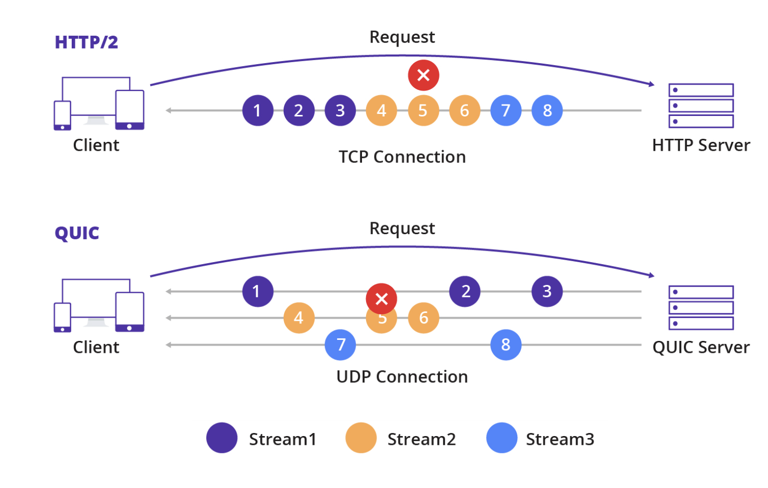
- Multiplexed Streams: Unlike TCP, QUIC allows multiple independent streams in one connection without transport-level head-of-line blocking. So if one stream stalls, others keep going.
- Improved Mobility: QUIC connections use connection IDs, not just IP/port. This makes it resilient to IP changes, e.g. switching from Wi-Fi to 5G.
- Built-in Encryption: QUIC is always encrypted via TLS 1.3 — there’s no plaintext mode.
- Lower Latency: It is well suited to HTTP/3 and many interactive applications, including low-latency streaming and gaming.
QUIC provides streams, and it can optionally provide datagrams when the extension is negotiated:
Streams
- ordered
- reliable
- flow-controlled
- optionally bidirectional
Datagrams
- unordered
- unreliable
- not flow-controlled
- useful when the application prefers timeliness over retransmission
In the following image we can see how QUIC is able to handle multiple streams in a single connection:
Another key feature of QUIC is how fast the connection setup can be. In the following comparison, QUIC completes the handshake in 1-RTT, while resumed connections can additionally send 0-RTT application data:
  sequenceDiagram
    participant Client_TCP as Client (TCP + TLS)
    participant Server_TCP as Server (TCP + TLS)

    Client_TCP->>Server_TCP: SYN
    Server_TCP->>Client_TCP: SYN-ACK
    Client_TCP->>Server_TCP: ACK
    Note right of Server_TCP: TCP connection established

    Client_TCP->>Server_TCP: ClientHello
    Server_TCP->>Client_TCP: ServerHello + Cert
    Client_TCP->>Server_TCP: Finished
    Server_TCP->>Client_TCP: Finished
    Note over Client_TCP,Server_TCP: Encrypted communication begins (up to 6 RTT)

    %% QUIC section
    participant Client_QUIC as Client (QUIC)
    participant Server_QUIC as Server (QUIC)

    Client_QUIC->>Server_QUIC: Initial + ClientHello + 0-RTT Data
    Server_QUIC->>Client_QUIC: ServerHello + EncryptedExtensions + Finished
    Client_QUIC->>Server_QUIC: Finished
    Note over Client_QUIC,Server_QUIC: Encrypted communication begins in 1 RTT
    Note over Client_QUIC,Server_QUIC: Resumed connections may send 0-RTT data
WebTransport
Unlike WebSockets, WebTransport is not a socket API layered directly on raw UDP. It is a browser API built on top of HTTP/3 over QUIC, exposing streams and datagrams while hiding most of the transport details from the application.
WebTransport is:
- A modern browser API for low-level, bidirectional communication between client and server
- Designed for real-time and streaming use cases
- An alternative to WebSockets or request/response HTTP when an application needs finer transport control
It works:
- Built on top of HTTP/3, which itself runs over QUIC
- Provides reliable streams and optional unreliable datagrams, optimized for modern web needs
- Gives browser applications a practical way to receive QUIC-backed media data and feed it into browser-side decoders such as WebCodecs
The web-transport-quinn crate used by the plugin takes this approach:
- Hides the HTTP/3 and QUIC layering details
- Exposes a clean QUIC-focused API
- Delegates protocol handling to the underlying Quinn implementation (a Rust-based QUIC library)
RoQ
RTP over QUIC (RoQ) is an IETF Internet-Draft that maps RTP and RTCP over QUIC. The draft explores how RTP media can benefit from QUIC transport features and how some transport information already available inside QUIC endpoints may reduce the need for separate signaling. Some of the motivations and possible benefits discussed in the draft are:
- Encryption and congestion control: QUIC always uses TLS 1.3 and includes transport congestion control. That does not remove all RTP or application logic, but it does provide a stronger transport baseline than plain RTP over UDP.
- RTP rate adaptation: QUIC feedback can inform rate adaptation, but the application still needs to decide how to react to that feedback.
- Path characteristics: QUIC requires support for packets of at least 1200 bytes on a validated path, which provides a clearer lower bound when designing packetization strategies.
- Multiplexing RTP, RTCP, and non-RTP flows on a single QUIC connection: QUIC streams can carry multiple flows over one connection, which may reduce port usage across NATs and firewalls.
- Connection migration: QUIC connection IDs allow a connection to survive some path changes, such as moving from Wi-Fi to 5G, without forcing the application to create a new transport session.
- Future multipath work: Multipath support is still under development in the IETF. It is better understood as using multiple network paths for a connection, not as sending one media input to multiple endpoints.
In a browser-oriented workflow, the interesting part of RoQ is that QUIC-native media delivery becomes easier to experiment with once the browser can access QUIC-style streams or datagrams and pass the resulting encoded media to APIs such as WebCodecs.
MoQ
Media over QUIC (MoQ) is another IETF effort for live media delivery over QUIC. Unlike RoQ, which keeps the RTP media model and remaps it onto QUIC, MoQ follows a pub/sub model built around tracks, groups, and objects. That structure is attractive for large-scale live distribution because it makes prioritization, caching, and fan-out more natural.
For browser delivery, MoQ is commonly discussed together with WebTransport and WebCodecs: WebTransport provides the browser-accessible transport path, while WebCodecs can decode the media once the application has reconstructed the stream. This combination is one of the reasons MoQ is often presented as a promising direction for future low-latency media distribution on the web.
WebRTC vs MoQ vs RoQ
| Feature / Aspect | WebRTC | MoQ | RoQ |
|---|---|---|---|
| 🔧 Designed for | Real-time interactive audio/video in browsers | Live media publication, subscription, and large-scale distribution over QUIC | WebRTC-like media delivery in browsers, but with more application control |
| 🧩 Media Model | RTP-based browser media pipeline | Object and pub/sub model with tracks, groups, and objects | RTP media model preserved over a QUIC transport |
| 🎞️ Codec Flexibility | Limited to the codecs and profiles exposed by the browser’s WebRTC implementation | Can use browser-supported codecs and, when needed, application-managed decoders such as third-party WebAssembly codecs for formats the browser does not natively support | Can use browser-supported codecs and, in browser deployments, application-managed decoders such as third-party WebAssembly codecs for formats outside native WebRTC support |
| 📡 Transport Basis | RTP/RTCP over UDP with ICE, DTLS, SRTP | QUIC-based transport, typically discussed with WebTransport in browsers | RTP/RTCP over QUIC, typically exposed in browsers through WebTransport |
| 📉 Latency Profile | Low latency with a mature browser stack | Aims to cover low-latency live delivery and scalable fan-out | Low latency with fuller application control over the RTP stack |
| 🛠️ Adaptation Strategy | Browser-managed congestion control and media recovery | Application and protocol design choose prioritization, caching, and delivery policy | Reuses RTP workflows while benefitting from QUIC transport features |
| 📺 Browser Path | Native and widely deployed | Usually paired with WebTransport plus WebCodecs/WebAudio in browser discussions | WebTransport + WebCodecs, with the RTP handling kept in the application |
| 🌐 NAT Traversal | Built in via ICE/STUN/TURN | Depends on the deployment model; no WebRTC-style ICE by default | Depends on the deployment model; no WebRTC-style ICE by default |
| 📦 Scalability Focus | Strong for communication, but media fan-out often needs SFUs or MCUs | Explicitly oriented toward pub/sub distribution and relay/CDN fan-out | Keeps RTP workflows; scalability depends on surrounding architecture |
| 🔧 Integration Cost | Lowest in browsers because the stack is already there | Higher, because applications handle more of the media pipeline | Higher, because the browser-side application effectively needs to build part of the RTC stack on top of WebTransport and WebCodecs |
| 🌍 Standardization Status | Mature and broadly deployed | Emerging IETF work and active experimentation | Internet-Draft and still evolving |
WebTransport support in GStreamer
During the past GStreamer Conference in Montreal, Fluendo has been working to upstream this contribution. The WebTransport elements now live in the Quinn plugin family inside the quinn related elements.
QUINN is a Rust implementation of the QUIC protocol. In GStreamer, the new QUINN elements were recently added, enabling to work with this protocol in GStreamer.
While quinnquicsrc, quinnquicsink, and related elements allow sending and receiving data over QUIC, browser-facing WebTransport support needs the HTTP/3 + WebTransport layer on top. Based on the crate web-transport-quinn, Fluendo contributed the WebTransport elements quinnwtsrc and quinnwtsink. Conceptually, Quinn’s Connection becomes a WebTransport Session. Apart from that, working with quinnquicsink and quinnwtsink is quite similar, as you can appreciate in this example.
Both elements allow local experimentation in non-secure mode and also support secure mode by configuring certificates. In practice, browsers generally require the secure path with a certificate trusted by the client. The source exposes key transport parameters like:
use-datagram: As discussed above, QUIC can use streams and, when negotiated, datagrams. This option allows choosing datagram mode instead of the default streams mode.datagram-receive-buffer-size: Maximum number of incoming application datagram bytes to bufferdatagram-send-buffer-size: Maximum number of outgoing application datagram bytes to bufferdrop-buffer-for-datagram: Drop buffers when using datagram if buffer size > max datagram sizemin-mtu: Maximum UDP payload size guaranteed to be supported by the network, must be <= initial-mtu
QUINN WebTransport pipeline examples
In the following pipeline we are going to showcase how to work with these elements and the different possibilies it offers.
Example of audio using STREAM mode
We can transmit audio without RTP payloaders by using STREAM mode:
gst-launch-1.0 \
    quinnwtsrc \
        secure-connection=false \
        url="https://localhost:4445" ! \
    opusparse ! \
    opusdec ! \
    queue ! \
    audioconvert ! \
    autoaudiosink \
;
gst-launch-1.0 \
    audiotestsrc \
        is-live=true ! \
    opusenc ! \
    quinnwtsink \
        secure-connection=false \
        address=127.0.0.1 \
        port=4445 \
;
Example of video using DATAGRAM mode
We can also transmit video by splitting the packets with RTP payloaders and using DATAGRAM mode:
gst-launch-1.0 \
    quinnwtsrc \
        url="https://localhost:4445" \
        secure-connection=false ! \
    capsfilter \
        caps="application/x-rtp,payload=96,media=video,encoding-name=H264,clock-rate=90000"  ! \
    rtph264depay ! \
    h264parse ! \
    openh264dec ! \
    queue ! \
    videoconvert ! \
    xvimagesink \
;
gst-launch-1.0 \
    videotestsrc \
        is-live=true \
        do-timestamp=true ! \
    openh264enc ! \
    h264parse ! \
    rtph264pay \
        mtu=1000  \
        pt=96  ! \
    queue ! \
    quinnwtsink \
        address=127.0.0.1 \
        port=4445 \
        use-datagram=true \
        secure-connection=false \
;
Example of video using STREAM mode
In STREAM mode there is no need to use payloaders. However, some other parameters, MTU related mostly, might be needed to adjust to the current network.
gst-launch-1.0 \
    videotestsrc \
        is-live=true \
        do-timestamp=true ! \
    openh264enc ! \
    quinnwtsink \
        address=127.0.0.1 \
        port=4445 \
        secure-connection=false \
;
gst-launch-1.0 \
    quinnwtsrc \
        url="https://localhost:4445" \
        secure-connection=false ! \
    queue ! \
    h264parse ! \
    avdec_h264 ! \
    xvimagesink \
;
A more complex example using one of the key features of QUIC, multi streams in a single connection. quinnquicmux and quinnquicdemux help us in that task:
gst-launch-1.0 \
    quinnquicmux name=mux ! \
    quinnwtsink \
        address=127.0.0.1 \
        port=4445 \
        secure-connection=false \
    videotestsrc \
        is-live=true \
        do-timestamp=true ! \
    "video/x-raw,width=640,height=480" ! \
    videoconvert ! \
    openh264enc ! \
    mux.stream_0 \
    videotestsrc \
        is-live=true \
        pattern="ball" \
        do-timestamp=true ! \
    "video/x-raw,width=640,height=480" ! \
    videoconvert ! \
    openh264enc ! \
    mux.stream_1 \
;
gst-launch-1.0 \
    compositor name=comp sink_1::xpos=640 ! \
    xvimagesink \
    quinnwtsrc \
        url="https://localhost:4445" \
        secure-connection=false ! \
    quinnquicdemux name=demux \
    demux.stream_0 ! \
    queue ! \
    h264parse ! \
    avdec_h264 ! \
    comp.sink_0 \
    demux.stream_1 ! \
    queue ! \
    h264parse ! \
    avdec_h264 ! \
    comp.sink_1 \
;

The Gst.WASM WebTransport source elements created for SPIRIT project
In the scope of gst.wasm, we developed a couple of GStreamer elements. They were needed to make all the workflow work. These elements are:
WebTransportSrc: This is the main GStreamer element, which connects the WebTransport API with the GStreamer side. It is a bin and wraps theWebTransportweb API. It manages streams (WebTransportDatagramDuplexStreamfor datagrams andReadableStreamfor streams) creation creating a childWebTransportStreamSrcelement for each.WebTransportStreamSrc: It is in charge of reading the buffers from the WebTransport object, aReadableStream. Then, as aPushSrcelement, it implements thecreate()to provide the buffers downstream with the data read from theReadableStream.
The following is a gst.wasm receiver pipeline that allow us to show the video data into our web browser:
webtransportsrc \
    location=\"https://127.0.0.1:4443\" \
    name=src \
    datagrams-incoming-high-water-mark=1000 \
    datagram::do-timestamp=true \
    src.datagram ! \
queue ! \
application/x-rtp, clock-rate=90000, payload=96, media=video, encoding-name=H264 ! \
rtph264depay ! \
webcodecsviddech264sw ! \
webcanvassink
So, now we can provide GStreamer a video stream through quinnwtsink, which is read by the WebTransport API described above. The following pipeline:
gst-launch-1.0 \
    videotestsrc \
        is-live=true \
        do-timestamp=true ! \
    openh264enc ! \
    h264parse ! \
    rtph264pay pt=96 ! \
    queue ! \
    quinnwtsink \
        use-datagram=true \
        address=127.0.0.1 \
        port=4443 \
        certificate-file=ext/moq-rs/dev/localhost.crt \
        private-key-file=ext/moq-rs/dev/localhost.key \
;
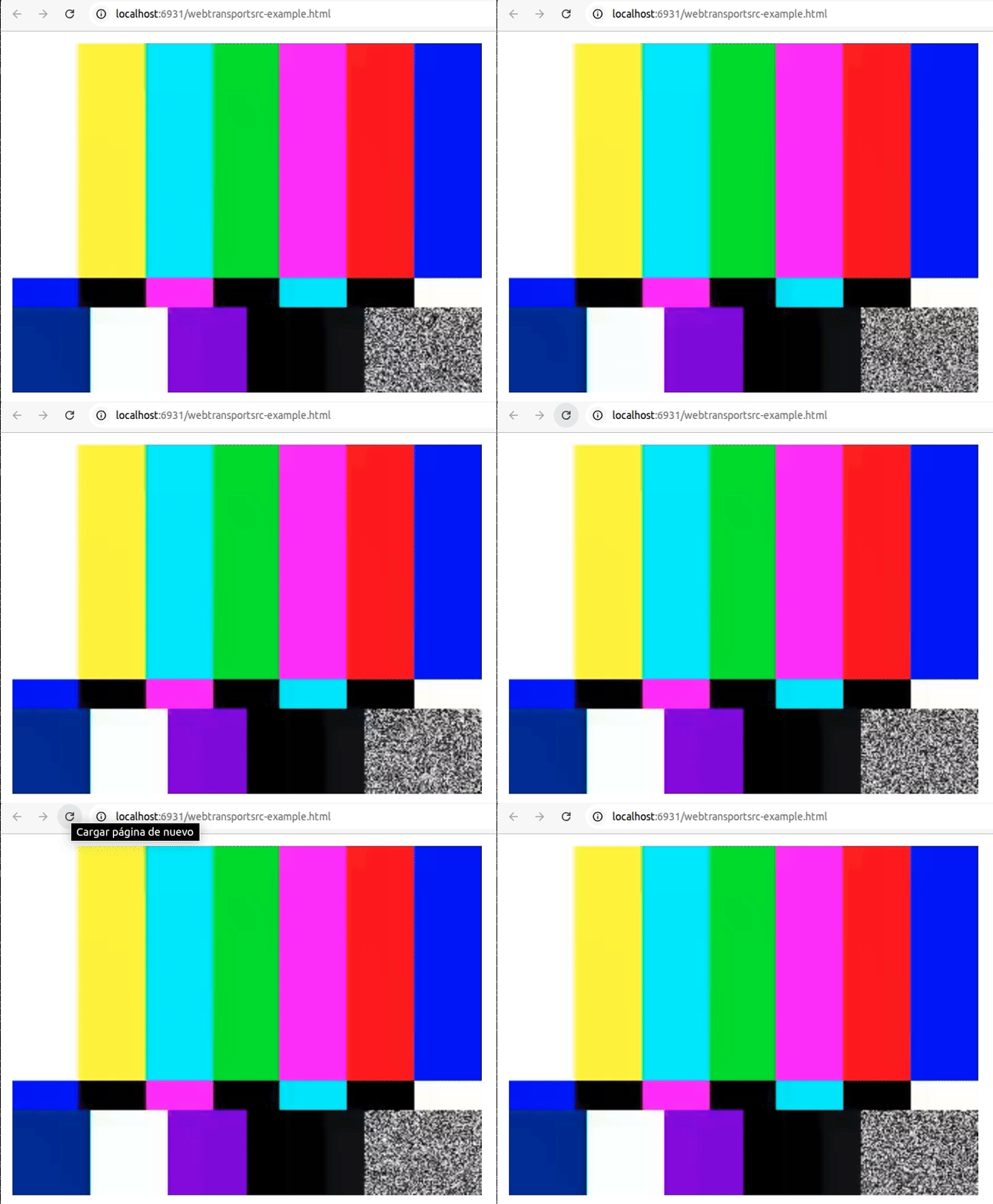
Can be directly playback in the browser:
If you want learn more about gst.wasm, we encourage you to read this and visit our gst.wasm respository.