
Screen Content Coding Tools for Remote Desktop Streaming

Written by
Sergio SánchezJuly 22, 2026
Remote desktop streaming is a challenging workload for general-purpose video codecs. Unlike camera-captured video, desktop content is dominated by sharp edges, small text, icons, flat color regions, application windows, terminal output, tables, and repeated UI structures. These characteristics make compression artifacts more visible and more disruptive: a slightly blurred edge in natural video may be acceptable, but blurred text in a remote desktop session directly affects usability.
In this prototype, we investigated the impact of Screen Content Coding (SCC) tools on video quality and encoding efficiency for DaaS & VDI scenarios. We used SVT-AV1 as the experimental vehicle because it exposed SCC tools that could be isolated. The main comparison was built around two configurations of the same codec: SVT-AV1 with the broader coding toolset disabled and SVT-AV1 with only SCC tools enabled.
We also included SVT-AV1 default and x264 low latency as secondary references. SVT-AV1 default helped us understand the behavior of the full codec configuration, while x264LL provided a practical low-latency reference. The broader goal was to validate a repeatable methodology: remove the general coding tools, add SCC in isolation, and evaluate whether the resulting configuration improves desktop-content compression.
Why desktop content needs specific coding tools
Most video codecs are optimized around assumptions that fit natural video: camera motion, textured regions, gradients, noise, and photographic detail. Desktop content behaves differently. It contains hard edges, synthetic graphics, text glyphs, flat areas, and repeated shapes. Preserving these details is essential for remote desktop quality, especially in office applications, development environments, browser-based workflows, CAD tools, spreadsheets, dashboards, and terminal sessions.
Generic low-latency encoding configurations often reduce complexity by disabling expensive coding tools. This is useful for responsiveness, but it can also limit compression efficiency and visual quality. Next-generation codecs also include many advanced tools that improve natural-video compression but may not contribute useful gains for desktop content.
Screen Content Coding tools were designed for synthetic and screen-like content. They target patterns that appear frequently in desktop captures, such as repeated blocks, sharp boundaries, and limited color structures. Our hypothesis was that SCC tools could improve the compression-quality trade-off for desktop content when compared with a minimal codec configuration where the broader toolset was disabled.
Methodology: isolating SCC with a tool-on experiment
We structured the prototype around a controlled tool-on methodology. We took a codec implementation with available SCC tools, disabled the broader set of encoding tools as much as possible, and then added only SCC tools to observe their isolated effect. SVT-AV1 was the concrete implementation used for this experiment.
The experimental matrix included four configurations:
| Configuration | Role in the experiment |
|---|---|
| SVT-AV1 all-tools-off | Main implementation baseline. Used as an example of a codec configuration where the broader coding toolset was disabled. |
| SVT-AV1 SCC tool-on | Main experimental configuration. Built from the all-tools-off baseline, with only SCC tools added back in. |
| SVT-AV1 default | Secondary reference for the full default codec configuration. |
| x264LL | Secondary industry reference for practical low-latency encoding. |
We used FFmpeg to run the encoding tests and automate the benchmark workflow. The prototype collected real encoding time, encoding speed, CPU encoding time, bitrate, BD-Rate, VMAF, and subjective visual quality observations. These metrics allowed us to evaluate both objective codec behavior and practical desktop quality factors such as text readability, compression artifacts, and color fidelity.
Results: encoding performance vs. complexity
The first result block compared encoding time, encoding speed, CPU encoding time, and BD-Rate across the four configurations. In the source table, BD-Rate was reported relative to x264LL, but the most important technical interpretation was the difference between SVT-AV1 all-tools-off and SVT-AV1 SCC tool-on, because that comparison represented the tool-isolation methodology.
Table 1. Encoding performance and complexity comparison.
Comparison of x264LL, SVT-AV1 default, SVT-AV1 all-tools-off, and SVT-AV1 SCC tool-on. The table reports real encoding time, encoding speed relative to source duration, encoding speed difference to the secondary x264LL reference, CPU encoding time, CPU encoding time difference, and BD-Rate.
| Encoder configuration | Real encoding time | Encoding speed | Encoding speed diff. to x264LL | CPU encoding time | CPU encoding time diff. to x264LL | BD-Rate |
|---|---|---|---|---|---|---|
| x264LL | 1.73 | 5.78× | 0.00% | 9.75 | 0.00% | 0 |
| SVT-AV1 default | 6.11 | 1.64× | -111.95% | 68.21 | 149.99% | -77.13 |
| SVT-AV1 all-tools-off | 3.82 | 2.62× | -75.45% | 11.20 | 13.92% | -25.12 |
| SVT-AV1 SCC tool-on | 3.39 | 2.95× | -65.18% | 11.05 | 12.58% | -41.02 |
Enabling SCC on top of the all-tools-off baseline improved BD-Rate from -25.12 to -41.02, an additional improvement of roughly 16 percentage points over the reduced-complexity SVT-AV1 baseline. SVT-AV1 default achieved the strongest BD-Rate reduction, but at much higher encoding complexity. The SCC tool-on configuration therefore provided a more relevant trade-off for low-latency desktop streaming: better compression than the minimal baseline while remaining much closer to the low-complexity configurations than to the full default codec.
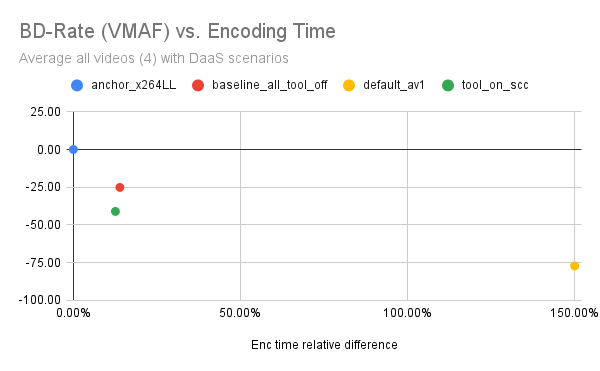
Figure 1. BD-Rate versus encoding time for the four encoder configurations.
Scatter plot comparing x264LL, SVT-AV1 default, SVT-AV1 all-tools-off, and SVT-AV1 SCC tool-on across four DaaS-oriented test sequences. The graph visualizes the trade-off between compression efficiency and encoding time.
We also observed that enabling SCC did not increase real encoding time in the specific measurements reported in the table. This was unexpected because adding coding tools would normally be expected to increase complexity. We treated that result carefully because elapsed encoding time can be affected by runtime fluctuations such as caching, system load, or thermal behavior. Future work should use lower-level complexity metrics, such as CPU instructions, to make this analysis more robust.
Rate-distortion behavior
The rate-distortion curves provided a more detailed view of how each configuration behaved across bitrates. We evaluated two screen-content sequences and plotted VMAF against bitrate.
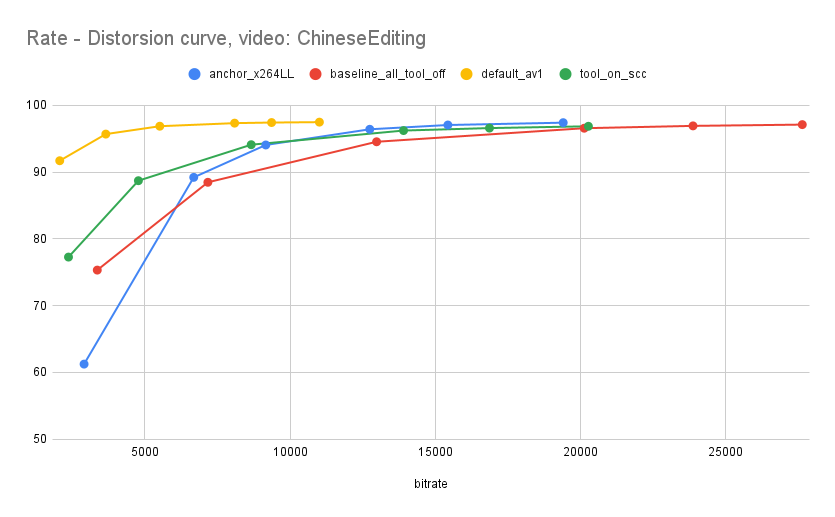
Figure 2. Rate-distortion curve for the ChineseEditing sequence.
VMAF versus bitrate for x264LL, SVT-AV1 default, SVT-AV1 all-tools-off, and SVT-AV1 SCC tool-on. The figure shows how each configuration behaved across bitrate points for a text-heavy desktop sequence.
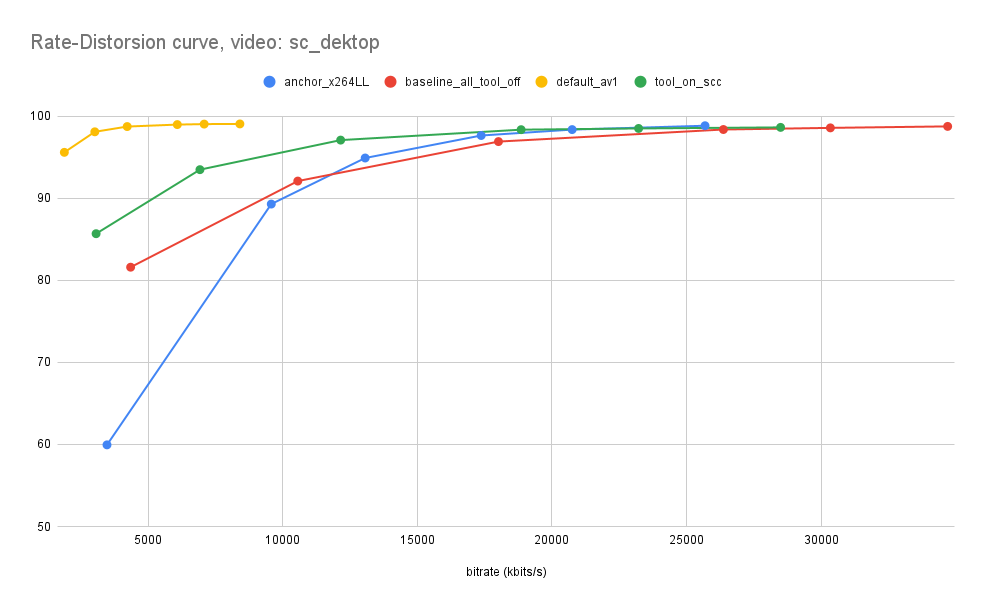
Figure 3. Rate-distortion curve for the sc_desktop sequence.
VMAF versus bitrate for x264LL, SVT-AV1 default, SVT-AV1 all-tools-off, and SVT-AV1 SCC tool-on. The figure highlights the behavior of SCC in a desktop sequence with mixed text, windows, terminal output, and graphical elements.
The curves showed that SCC improved quality per bitrate, especially at lower bitrates. This is important for DaaS & VDI because constrained network conditions are where artifacts become most visible to users. The SCC-enabled configuration moved the reduced-complexity SVT-AV1 baseline toward better compression efficiency without requiring the full default SVT-AV1 toolset.
Visual quality analysis
We analyzed visual quality in two ways. First, we used frame-by-frame VMAF to understand not only average quality, but also quality stability across time. This matters for remote desktop streaming because short quality drops can make text unreadable or cause UI elements to flicker visually.
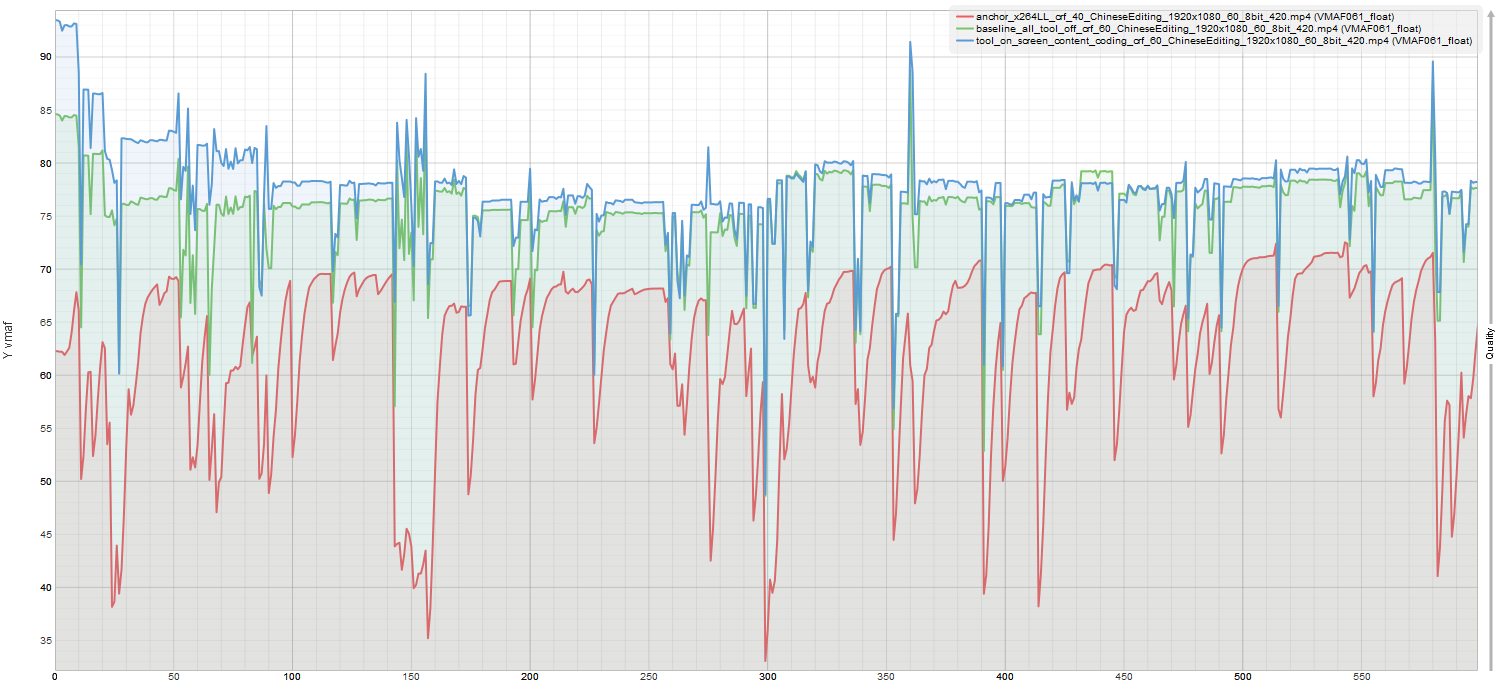
Figure 4. ChineseEditing VMAF frame-by-frame comparison.
Frame-by-frame VMAF comparison of the uncompressed ChineseEditing sequence against versions encoded with x264LL, SVT-AV1 all-tools-off, and SVT-AV1 SCC tool-on. Analysis was performed using the MSU Video Quality Measurement Tool.
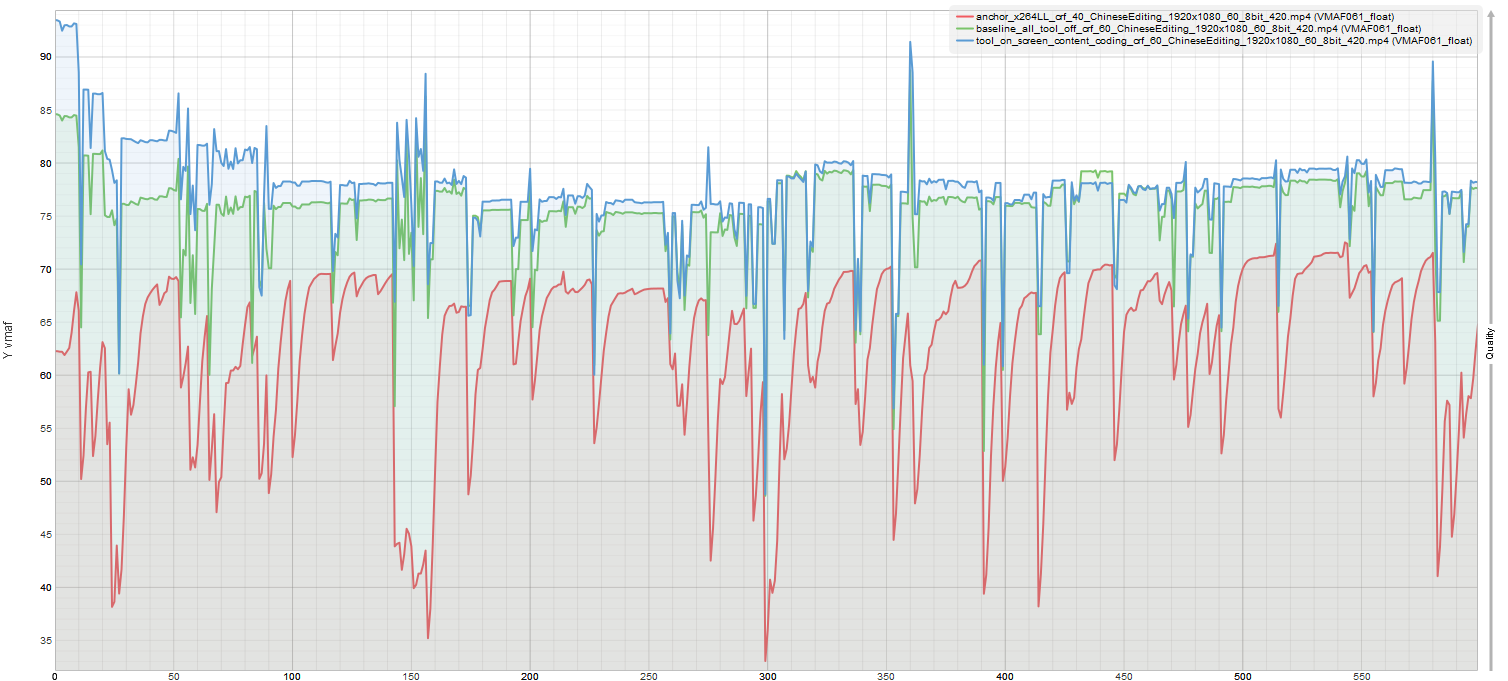
Figure 5. sc_desktop VMAF frame-by-frame comparison.
Frame-by-frame VMAF comparison of the uncompressed sc_desktop sequence against versions encoded with x264LL, SVT-AV1 all-tools-off, and SVT-AV1 SCC tool-on. Analysis was performed using the MSU Video Quality Measurement Tool.
The VMAF graphs showed that x264LL had the greatest variability, with several sharp quality drops. SVT-AV1 all-tools-off behaved more consistently, but with lower average quality than the SCC-enabled configuration. SCC tool-on produced more stable VMAF behavior and fewer fluctuations, especially in scenes containing text and integrated graphics.
Second, we inspected selected frames from regions where the VMAF curves showed sudden downward peaks. The subjective review focused on detail definition, compression artifacts, and color fidelity.
ChineseEditing sequence
The following frames compare the same region of the ChineseEditing sequence across the original source and the three encoded outputs.




Figure 6. ChineseEditing subjective quality comparison.
Original frame and encoded outputs for x264LL, SVT-AV1 all-tools-off, and SVT-AV1 SCC tool-on. The comparison focuses on text readability, compression artifacts, and color fidelity in a text-heavy desktop sequence.
In this sequence, x264LL showed visible text degradation, especially in small and colored text. SVT-AV1 all-tools-off preserved some structure but introduced artifacts around text and colored backgrounds. SVT-AV1 SCC tool-on provided better general readability and color fidelity, although some blur remained in difficult regions.
sc_desktop sequence
The following frames compare the same region of the sc_desktop sequence across the original source and the three encoded outputs.
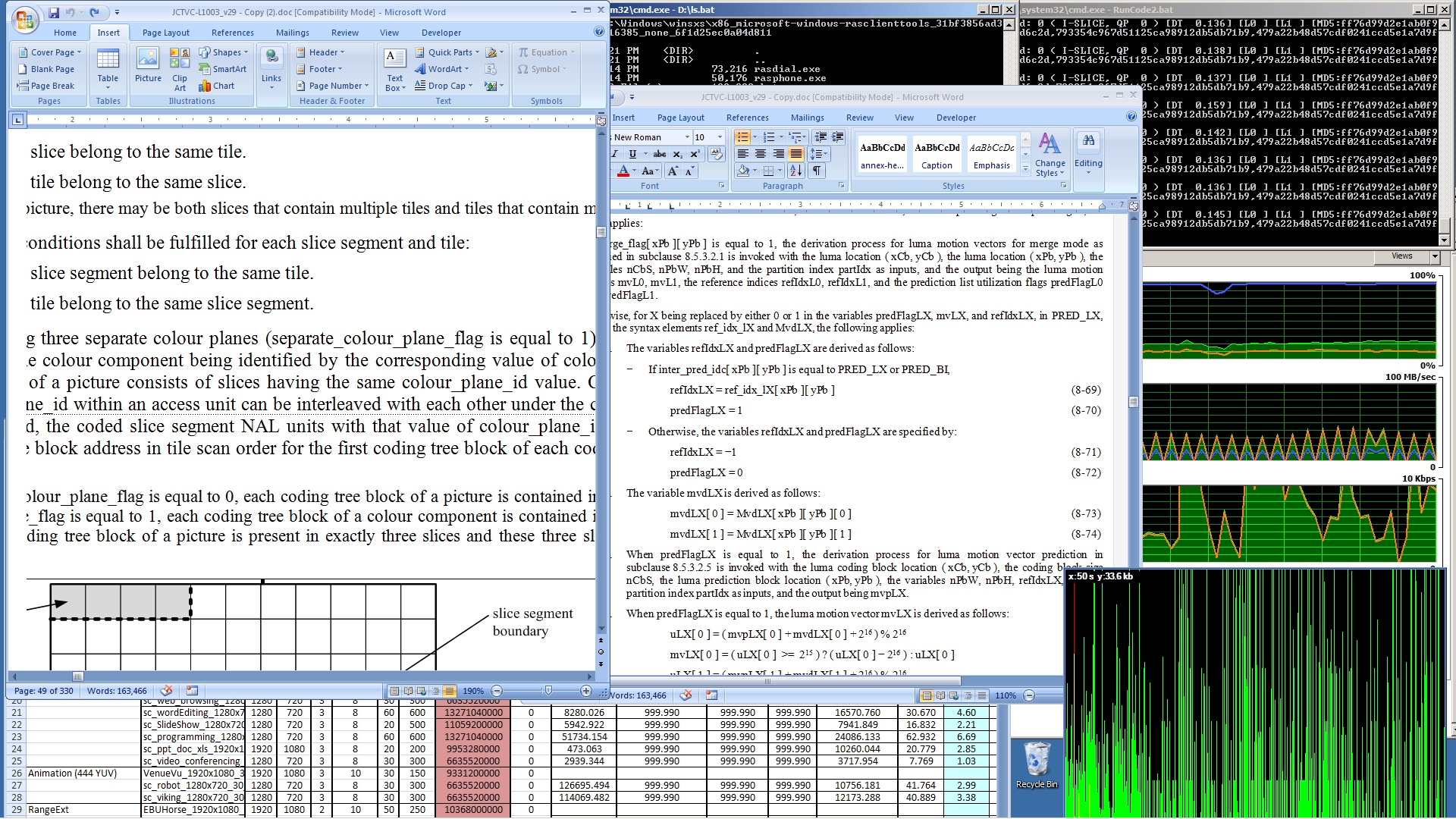
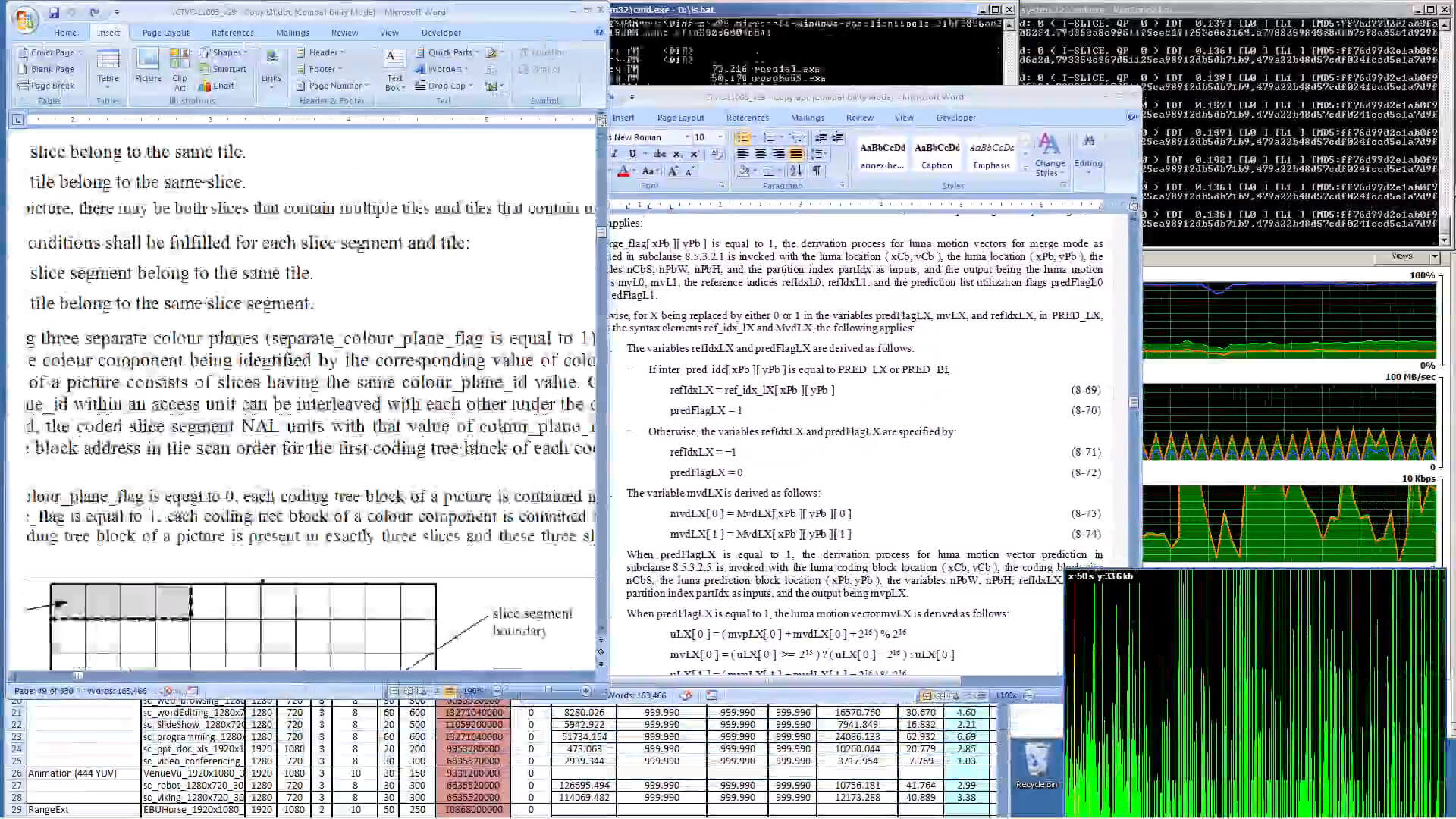
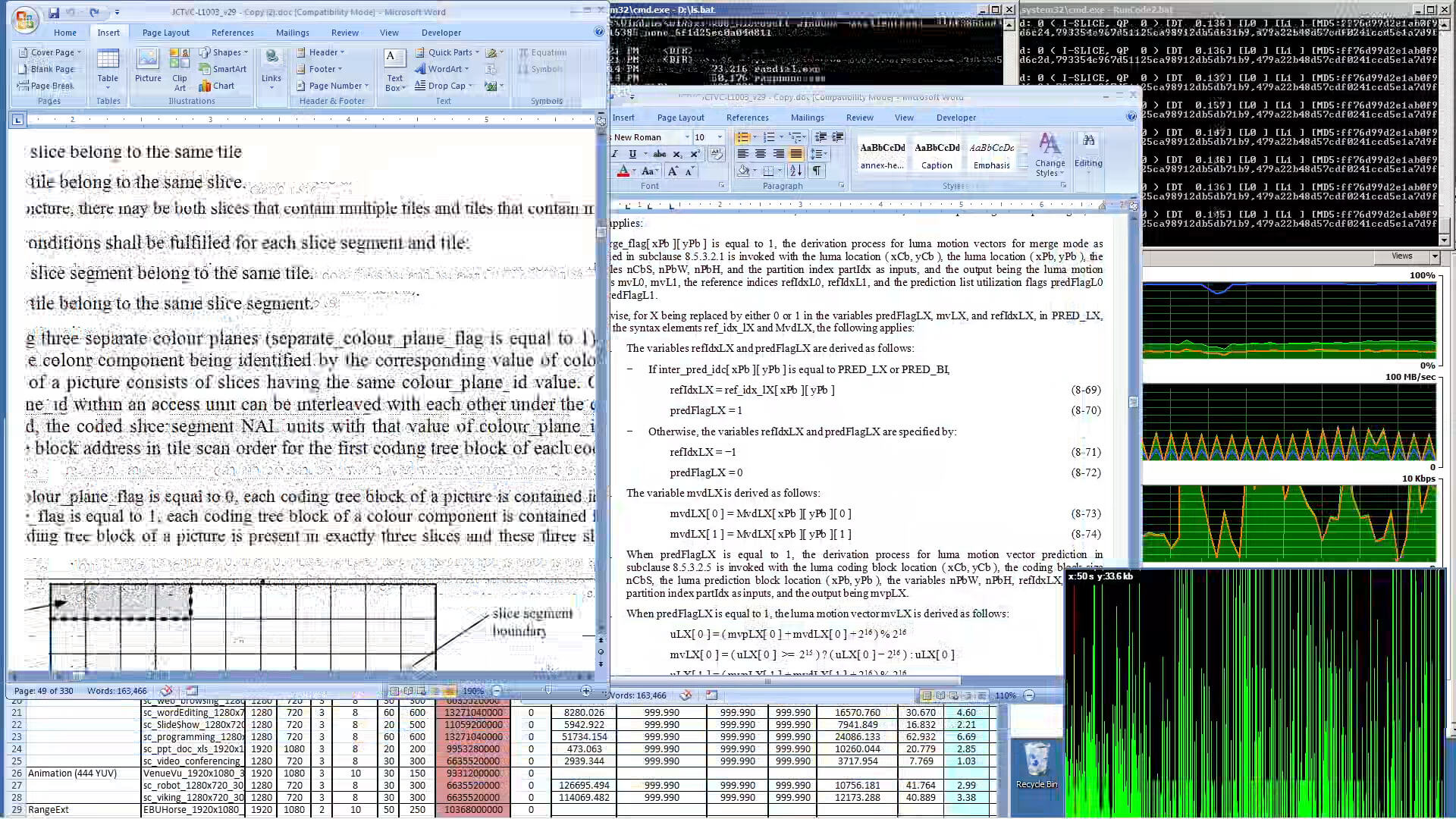
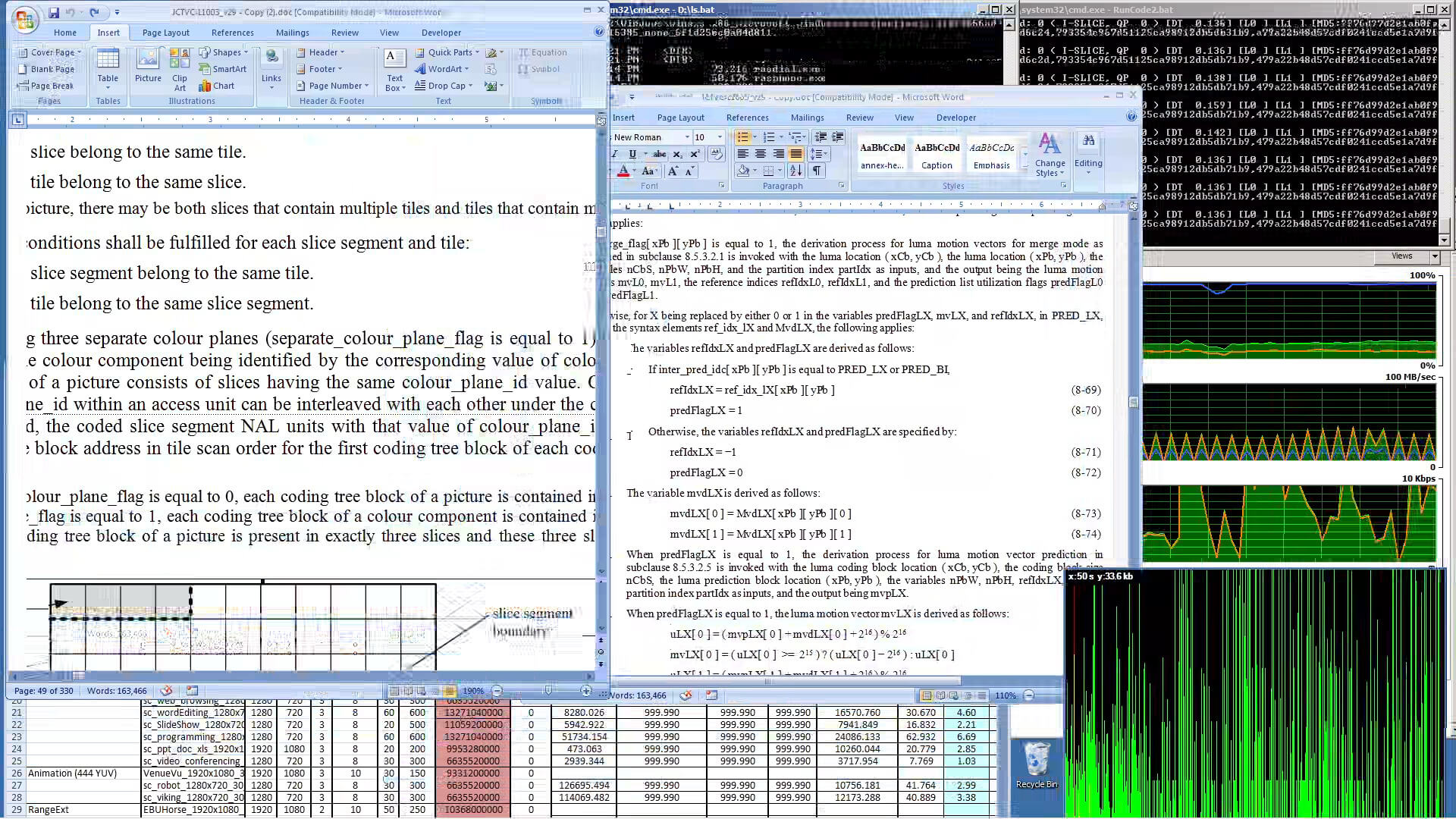
Figure 7. sc_desktop subjective quality comparison.
Original frame and encoded outputs for x264LL, SVT-AV1 all-tools-off, and SVT-AV1 SCC tool-on. The comparison focuses on mixed desktop content with text, windows, terminal-like regions, and graphical elements.
In this sequence, SCC improved the subjective quality of text, color, and graphics compared with the reduced-complexity SVT-AV1 baseline. This supported the objective results by showing that the gains were visible in desktop-specific content, not only in aggregate metrics.
The subjective inspection reinforced the objective results and highlighted why desktop-content evaluation should not rely only on aggregate quality scores: text readability, chromatic artifacts, and UI edge stability directly affect usability.
Engineering challenges and limitations
The prototype exposed several engineering challenges.
First, mapping SVT-AV1 parameters and presets to specific coding tools was not straightforward. Some documented presets are associated with higher-level encoding behavior rather than direct one-to-one tool activation, which made tool isolation more complex.
Second, BD-Rate calculation required careful handling. Bjøntegaard metrics can be error-prone when rate-distortion curves have limited overlap or when anchor and distorted points differ significantly. This was especially relevant because the configurations did not always operate in the same rate-distortion region.
Third, adaptive encoding experiments introduced additional complexity. We tested a convex hull algorithm for rate-distortion curve optimization, but the results were inconsistent, so we kept the final evaluation at a single resolution per video. This simplified the analysis and avoided mixing SCC evaluation with unresolved adaptive-coding behavior.
Fourth, the VMAF model used in this prototype was not fully aligned with our screen-content use case. The version available at the time focused on luma-based features, limiting its ability to capture chromatic artifacts such as abrupt color changes around text, colored glyphs, and sharp UI elements on saturated backgrounds. Future evaluations should test newer quality metrics better suited to screen content, including VMAF v1, which adds chroma-aware features and CAMBI-based banding sensitivity.
Finally, elapsed encoding time was not robust enough as the only complexity metric. The prototype identified the need to measure complexity using CPU instructions or a similar lower-level signal to avoid runtime fluctuations caused by caching, system load, or thermal behavior.
Product impact: codec-agnostic SCC for RDCT
The product value of this prototype is broader than the tested SVT-AV1 configuration. The main outcome was a repeatable methodology for evaluating SCC independently from the rest of a codec toolset. That methodology can help identify which coding tools are truly useful for DaaS & VDI workloads, rather than assuming that every next-generation codec feature improves desktop streaming efficiency.
The next step should be to evolve this prototype into a codec-agnostic SCC toolkit for Fluendo’s Remote Desktop Coding Tools. RDCT already focuses on desktop-content optimization, integration with specialized coding tools, compatibility with existing codecs and infrastructure, and simplified integration through a unified API and GStreamer plugins. A codec-agnostic SCC toolkit would extend that strategy by packaging SCC as a reusable optimization layer for remote desktop streaming.
In product terms, this would allow RDCT to evaluate, enable, tune, or disable SCC-related behavior across different codec backends and customer environments. The long-term objective is to let RDCT select the most efficient toolset for desktop content independently of any single codec implementation.
Conclusions and next steps
This prototype showed that Screen Content Coding tools are a promising direction for remote desktop streaming. More importantly, it validated a methodology for testing whether SCC provides desktop-specific compression gains when isolated from the rest of the codec toolset.
The strongest technical result was the comparison between SVT-AV1 all-tools-off and SVT-AV1 SCC tool-on. SCC improved BD-Rate and subjective quality while staying much closer to the low-complexity configurations than to the full SVT-AV1 default configuration. The improvement was especially visible in text readability, graphics, color fidelity, and frame-level quality stability.
Future work should focus on productizing the SCC evaluation methodology inside the RDCT roadmap: improving the codec benchmarking framework, adding CPU-instruction-based complexity metrics, testing newer quality metrics such as VMAF v1, expanding the DaaS & VDI desktop sequence dataset, and defining a generic SCC abstraction behind RDCT’s unified API. If you are looking to optimize your own remote desktop workloads, get in touch with our team today to discuss how RDCT can fit into your infrastructure.
References
- Chen, Yue, et al. “An overview of core coding tools in the AV1 video codec.”
- J. Han et al., “A Technical Overview of AV1.”
- X. Xu and S. Liu, “Overview of Screen Content Coding in Recently Developed Video Coding Standards.”
- SVT-AV1 documentation
- x264 documentation
- AOM Common Test Conditions
- MSU codec comparison methodology
- FFmpeg threading and rate-control references
- Netflix Technology Blog, “VMAF v1: Good Is Not Good Enough.” Introduces VMAF v1 improvements including chroma-aware features, CAMBI for banding, updated motion handling, and new model variants.