
Guided encoder search optimization for remote desktop streaming

Written by
Sergio SánchezJuly 23, 2026
Remote desktop streaming is not a natural video workload. In a DaaS or VDI session, most of the desktop can remain static while a cursor blinks, a terminal updates, a window moves, or a video region changes. A conventional encoder still needs to analyze the full frame to decide where motion, prediction, partitioning, and mode decisions matter. That analysis is useful for general video, but in remote desktop scenarios, it can become redundant: the system that produced the desktop already knows which regions were refreshed.
In this prototype, we investigated whether desktop-context metadata could guide encoder decisions. We used dirty rectangles from the Windows desktop compositor as a concrete source of region-level metadata and explored how this information could become side information for low-delay screen-content encoding.
The work was connected to our Content-aware enhancements use case and was carried out in collaboration with Fraunhofer HHI. The formal encoder-level evaluation was published in the conference paper Optimizing an Open VVC Encoder for Low-Delay Remote Desktop Applications. This article focuses on Fluendo’s R&D perspective: what we built, what we learned, and how the results can inform Remote Desktop Coding Tools for the DaaS & VDI industry.
Why encoder search is expensive for desktop content
Modern codecs improve compression efficiency by expanding the encoder search space. They test more prediction modes, partitioning options, motion-vector candidates, and rate-distortion alternatives before selecting how to encode each region. This improves coding efficiency, but it also increases encoder-side complexity.
That trade-off is especially sensitive in remote desktop streaming. Low delay matters as much as compression efficiency, and the encoder cannot spend too much time analyzing every block if the session must remain interactive.
Desktop content also has different characteristics from natural video: large static areas, sharp text, flat colors, window boundaries, repeated UI elements, and localized updates. In many frames, the expensive part is not the whole image but a small set of changed regions. The prototype tested whether OS-provided active-region information could help reduce unnecessary search in static areas without compromising coding efficiency.
From ROI-based enhancement to encoder-side optimization
The original use case described a broader idea: in remote desktop environments, the OS, capture stack, or protocol can expose information that the encoder would otherwise need to infer from pixels. For the prototype, we reduced that idea to a concrete and testable signal: dirty rectangles.
Dirty rectangles are areas that the operating system marks for re-rendering because something changed. We built a Windows capture application using Microsoft’s IDXGIOutputDuplication API and its GetFrameDirtyRects method to capture these regions frame by frame. The application exported their coordinates and sizes into JSON files aligned with the captured raw video.
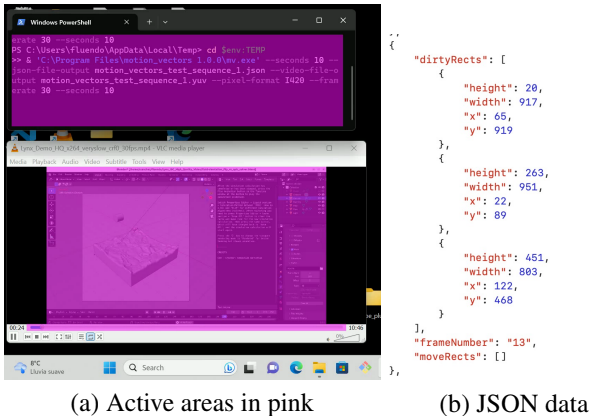
Figure 1. Dirty rectangle capture and JSON annotation.
Example of the Windows capture application identifying refreshed desktop regions and exporting frame-level JSON metadata. The dirty rectangles were later used as side information for encoder optimization.
This metadata correlated strongly with visible desktop activity, but it was not a perfect motion map. Some regions were marked as dirty even when the visible change was small or indirect. That observation became important later: dirty rectangles should guide encoder decisions, not replace encoder analysis completely.
Existing region-aware remoting vs. encoder-side search control
Region-aware desktop remoting is not a new idea. Several DaaS & VDI products already adapt their graphics pipeline depending on whether a region is static, changing, or video-like. For example, Citrix HDX can apply video codec compression to the whole screen or only to actively changing regions, while static or slowly changing areas can use still-image compression and bitmap caching. Microsoft Remote Desktop technologies have also evolved through adaptive graphics and H.264/AVC-based graphics compression.
Our prototype explored a lower-level question: can the same type of desktop context guide the internal search behavior of the encoder? Instead of selecting a different codec or compression mode for a region, we used OS-provided dynamic-region metadata to reduce motion search, partitioning, and mode-decision work inside a modern VVC encoder.
That is the main distinction. The contribution was not region detection by itself; it was the experimental validation of dynamic-region metadata as encoder-side side information.
Methodology: using active regions as encoder side information
For the encoder-side research, we worked with Fraunhofer HHI using VVenC, an open VVC/H.266 encoder implementation. VVenC gave us access to a modern codec with an expanded search space and enough flexibility to test low-delay remote desktop optimizations.
The research followed two complementary paths:
| Direction | Purpose |
|---|---|
| Encoder configuration optimization | Identify which VVC/VVenC tools were useful or unnecessary for low-delay screen content. |
| Guided encoder search optimization | Use OS-provided active-region metadata to reduce search effort in inactive regions. |
The prototype used four Full HD remote desktop sequences captured at 30 fps, each paired with JSON files describing dirty rectangles frame by frame. The sequences included different desktop activities: static windows, active video playback, moving windows, and mostly static desktop scenarios.
The active-region metadata was integrated into VVenC as side information. If a coding unit was fully inside an inactive region, the encoder could avoid expensive partitioning and mode-decision paths, provided that additional safety checks made the shortcut safe enough.
We evaluated three guided search strategies incrementally:
| Strategy | Purpose |
|---|---|
| Fast search | Stop testing further coding-unit splits in non-active regions and test only merge-skip. |
| Merge restriction | Restrict merge candidates to those referencing the previous frame, matching the semantics of frame-to-frame active-region data. |
| Key-frame check | Avoid applying fast search too aggressively on key frames unless the scene was sufficiently static. |
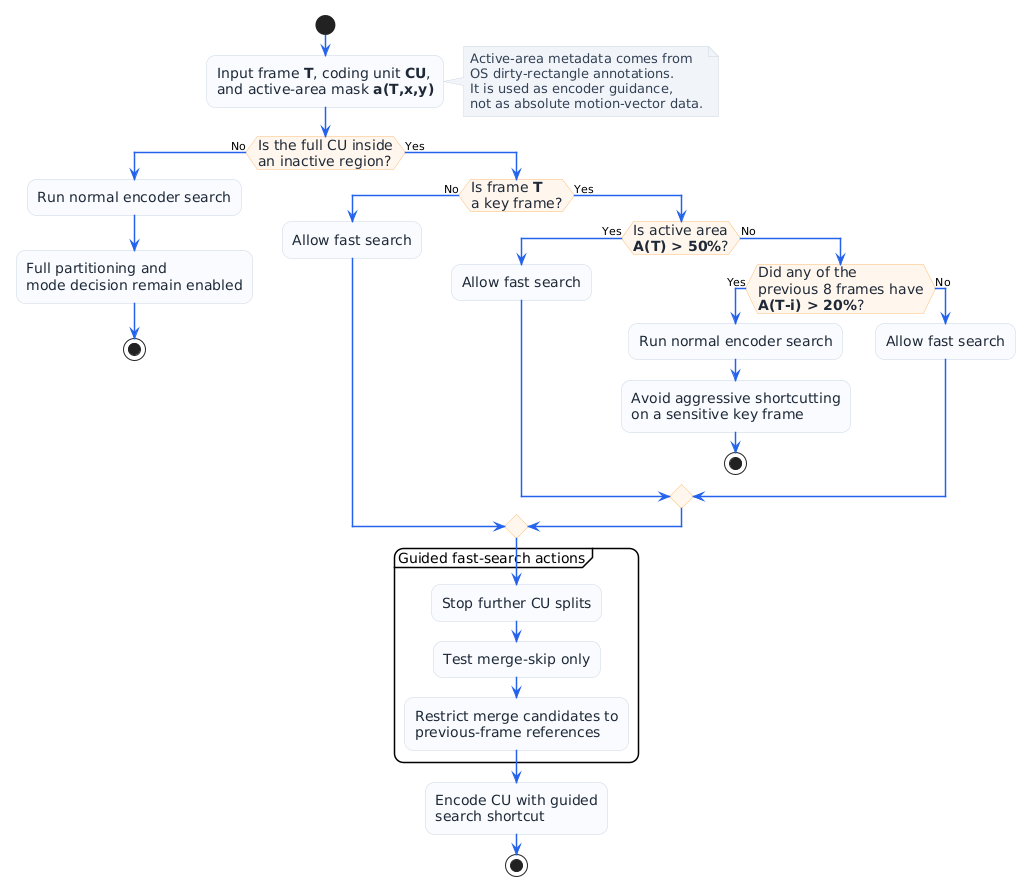
Figure 2. Guided search decision flow.
Encoder-side decision logic for using active-region metadata. Search was reduced only when the coding unit was inside an inactive area and the frame-level conditions made the shortcut safe enough. Source: adapted from the fast-search and key-frame-check flowcharts in Optimizing an Open VVC Encoder for Low Delay Remote Desktop Applications.
The key engineering idea was that dirty rectangles are not motion vectors. They are OS refresh hints, so the encoder should use them as guidance only where the risk of quality loss is low.
Results: reducing search complexity without sacrificing efficiency
The strongest result came from combining all three guided search optimizations. Fast search alone reduced encoding time but increased BD-rate, which meant the shortcut was too aggressive when used in isolation. Merge restriction compensated part of that efficiency loss, and the key-frame check further improved the balance.
The final combined strategy achieved:
| Result | Outcome |
|---|---|
| BD-rate reduction | Around 9.5% for PSNR and 11% for VMAF. |
| Encoding time reduction | Around 31% encoder time reduction. |
| Live encoding feasibility | Practical frame rates above 15 fps in the tested RDA sequences. |
| Main technical insight | OS-side active-region metadata can guide encoder search when applied with encoder-side safety checks. |
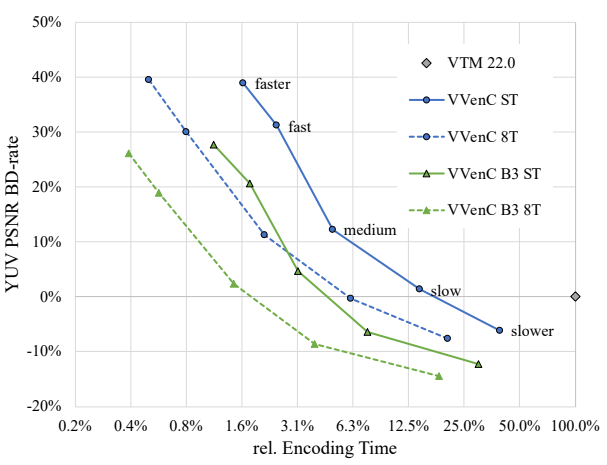
Figure 3. Guided search optimization results.
Bit-rate reduction versus encoding time for VVenC presets with and without the proposed guided search optimizations. Source: adapted from Figure 7 in Optimizing an Open VVC Encoder for Low Delay Remote Desktop Applications.
The result showed that encoder-side shortcuts must be content-aware. RDCT should not simply pass OS metadata into a codec and expect an automatic improvement. It should interpret, validate, and translate that metadata into safe encoder-control decisions.
Results: configuration optimization also mattered
The prototype also showed that not every advanced coding tool is useful for remote desktop content. Some VVC tools that are beneficial for natural video were less useful for the evaluated RDA sequences.
In particular, the research evaluated the effect of disabling:
- hierarchical QP cascading;
- motion-compensated temporal pre-filtering;
- block importance mapping.
For the tested RDA content, disabling these tools improved the coding-efficiency and complexity balance. This reinforces a broader RDCT principle: desktop streaming should not blindly inherit natural-video encoder defaults.
Product and industry impact
For Fluendo, the most relevant product implication is a desktop metadata control layer for RDCT. This layer would allow capture components, operating-system integrations, and remote desktop protocols to provide region-level information to the encoder through a codec-agnostic interface.
Different platforms may expose different metadata: dirty rectangles, active regions, window boundaries, content-type hints, cursor areas, text regions, video playback regions, or refresh history. RDCT could translate those signals into codec-specific decisions such as restricted motion search, adaptive partitioning, merge candidate pruning, region-based quality allocation, rate-control hints, selective enhancement, or screen-content-specific presets.
For DaaS & VDI providers, the value is the complexity-quality trade-off. More encoder work means more CPU or GPU cost per session; less encoder work can improve scalability, but only if visual quality remains acceptable. Guided encoder search targets that balance by reducing unnecessary analysis in regions that are unlikely to benefit from a full search while preserving more careful decisions for active or risky regions.
This is where Fluendo can add value beyond codec fundamentals. Existing products already use region-aware strategies at the protocol or graphics-pipeline level. RDCT can complement those strategies below the protocol layer, where encoder complexity, quality, and latency are decided.
| Value area | Impact |
|---|---|
| Cost reduction | Less encoder-side work can reduce compute requirements per session. |
| Product quality | Encoder decisions remain focused on regions that matter for perceived desktop quality. |
| Scalability | Lower complexity can help increase the number of concurrent remote desktop sessions per server. |
| Integration | OS and protocol metadata can become part of a reusable RDCT integration layer. |
Engineering limitations
The prototype exposed four limitations that are important for product work.
First, dirty rectangles are not precise motion vectors. They identify refreshed regions, but the refreshed area can be larger than the visually changed area. Future work should investigate whether more accurate changed-area data can be obtained from the capture stack, protocol layer, GPU APIs, or compositor.
Second, objective quality metrics are still weak for desktop content. Standard metrics do not always capture text clarity, graph readability, cursor sharpness, or UI stability. Better desktop-specific objective and subjective metrics would help evaluate RDCT optimizations more accurately.
Third, comparing optimized VVenC with other codecs requires a consistent benchmarking framework. The prototype showed promising VVC results, but RDCT needs a broader codec-comparison pipeline to evaluate how similar ideas apply across different codec backends.
Fourth, GStreamer integration was intentionally out of scope for the prototype. The research validated the encoder-control idea offline, but the product roadmap should evaluate how region metadata can be carried inside GStreamer buffers and exposed through RDCT APIs.
Conclusions and next steps
This prototype validated the core idea behind ROI-based encoder optimization for remote desktop streaming: the encoder should not infer everything from pixels when the desktop system already knows which regions changed.
By capturing OS dirty rectangles and using them as side information for VVenC, we showed that guided encoder search can reduce encoding time while maintaining coding efficiency. More importantly, the value is not limited to one VVC experiment. The broader result is an integration pattern: using desktop context to guide codec decisions.
For RDCT, the next step should be a product-oriented desktop metadata control layer. This layer would make region information available through a codec-agnostic API, allowing different codec backends to use the same desktop-context signals according to their own capabilities.
Future work should focus on integrating region metadata into GStreamer buffers, defining a generic RDCT API for desktop-context hints, comparing optimized encoder backends through Fluendo’s codec benchmarking framework, and validating the approach with broader DaaS & VDI datasets and screen-content quality metrics.
The long-term goal is to make RDCT not only a codec for remote desktop streaming, but a desktop-aware coding toolkit that understands the environment where the video is produced and uses that information to optimize quality, latency, and cost.
Ready to maximize your DaaS & VDI server density? Reach out to our team today to explore how Fluendo RDCT can transform your streaming pipeline.