

Bringing Dolby AC-4 to GStreamer: the journey to decoding

Written by
Pablo GarcíaMay 12, 2026
Dolby AC-4 is a Next-Generation Audio (NGA) codec designed for modern broadcast and streaming applications. It provides high audio quality at low bitrates while enabling advanced features such as immersive audio, personalized audio or accessible experiences. These capabilities make it particularly well-suited for adaptive streaming and next-generation TV standards.
However, integrating Dolby AC-4 into an existing multimedia framework like GStreamer presents several challenges. One of the key reasons behind GStreamer’s long-standing success and flexibility is its modular architecture. A pipeline is built from multiple elements, each handling a specific responsibility, which allows complex media processing workflows to be composed from reusable components.
For us at Fluendo, this meant that implementing only a proprietary AC-4 decoder was not enough. To properly integrate the format into the ecosystem, it was necessary to develop and contribute the surrounding elements required across the pipeline.
Beyond the decoder: building the AC-4 ecosystem
Our journey with Dolby AC-4 began during the Fluendo InnoDays 2026. This internal company event provides our team with the dedicated time and space to brainstorm, experiment, and innovate. Right from the start we utilized the official Dolby Pro Audio Decoder Software Development Kit (Dolby PADS). By the end of those few days of intense collaboration, we had a basic fluac4dec element working that was already capable of decoding AC-4 streams.
The architecture of our decoder relies heavily on the capabilities provided by this proprietary SDK. Specifically, we integrated two core modules:
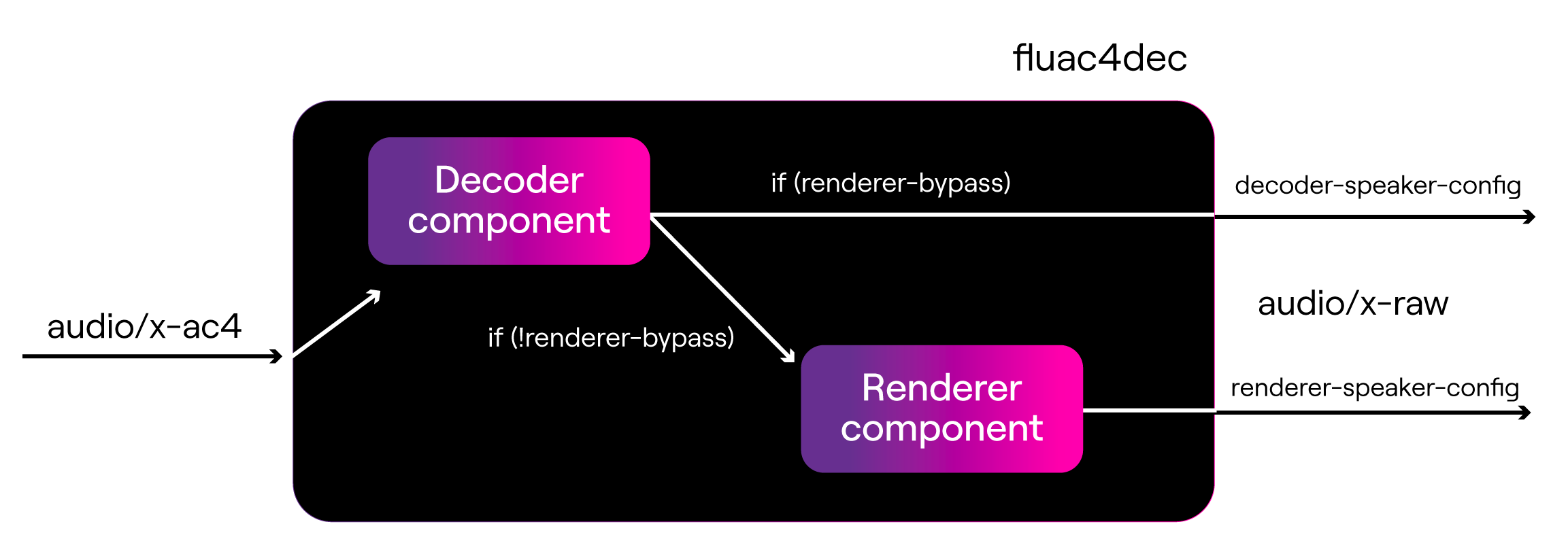
- Decoder component: this module is responsible for decoding the Dolby AC-4 bitstreams and outputting up to 10 channels of PCM audio.
- Renderer component: this module takes the decoded PCM audio from the decoder component and provides different rendered or downmixed versions according to the target speaker configuration.
Because GStreamer relies on a multi-element ecosystem, we didn’t just keep the development to ourselves. To ensure the format integrated into the broader multimedia framework, we created several Merge Requests to contribute essential surrounding elements back to the community, including an AC-4 typefinder, a MP4 muxer, fixups in qtdemux and tsdemux and, most importantly, an AC-4 parser. Parsers are key elements in GStreamer to properly inspect and frame data before decoding. We chose to implement the parser in Rust, not only to benefit from strong memory safety guarantees, but also to align with the GStreamer community’s ongoing efforts to adopt Rust for safer and more robust multimedia components.
But the heart of our work remains in the fluac4dec element. Not only does it decode Dolby AC-4 streams, but it can also negotiate capabilities with the other elements in the pipeline, handle UI metadata, and reconfigure midstream. In order to address advanced NGA features supported by AC-4, we have made several writable element properties within fluac4dec available to users, giving them full control over the stream. Some of the most relevant are:
- decoder-speaker-config: this property explicitly defines the output speaker configuration of the decoder component.
- renderer-bypass: this boolean property indicates whether or not to bypass the renderer component, and only process buffers through the decoder one.
- renderer-speaker-config: when the renderer is active, this defines the output speaker configuration of the renderer component.
- presentation-index: one of the standout features of AC-4 is its ability to carry multiple distinct audio experiences—such as different languages, audio descriptions, or director’s commentaries—within a single stream. This property dictates the index of the presentation to be selected and decoded.
- de-gain: adjusts the gain applied to the dialogue component of the audio stream.
The following figure illustrates how these properties behave to determine the number of output channels and their configuration. Note that not all existing user properties are depicted in the picture —including those describing UI metadata or presentation-index, among others— as they are omitted for claritty.
Beyond the decoding, one of the most powerful features we leveraged from the Dolby PADS SDK is its extensive support for UI-metadata. As the stream is processed, fluac4dec dynamically exposes real-time stream properties —such as the average bitrate, the framerate, or details about the active presentation (like language tags or dialogue normalization values). By signaling these metadata updates, we enable users to verify their AC-4 streams are compliant and delivering the exact experience they intended. This makes fluac4dec an invaluable tool not just for playback scenarios, but also for professional broadcasting monitoring and quality control workflows.
From code to sound - practical use cases
Thanks to these development efforts, our fluac4dec plugin is fully capable of decoding AC-4 streams while offering deep customization of the output audio. Because we exposed the SDK’s capabilities directly through GStreamer properties, users can easily manipulate the NGA features via the command line or within their applications.
Here are some examples showing how fluac4dec behaves within different GStreamer pipelines and potential scenarios.
- Automatic output number of channels negotiation: the simplest way to use the decoder. GStreamer will automatically negotiate a channel layout with the downstream element (like an audio sink).
gst-launch-1.0 filesrc location=sample.ac4 ! fluac4dec ! autoaudiosink
- Manual num-channels selection (decoder component): if you want to bypass downstream negotiation and force the decoder component to output a specific layout —such as immersive 5.1.4— you can explicitly declare it.
gst-launch-1.0 filesrc location=sample.trp ! tsdemux ! "audio/x-ac4" ! fluac4dec decoder-speaker-config=DLB_PADC_AC4_SPEAKER_CONFIG_5_1_4 ! autoaudiosink
- Manual num-channels selection (renderer component): to activate rendering, you must turn off the bypass and set your target layout. For AC-4, the Dolby renderer supports outputting up to a 5.1.4 immersive configuration.
gst-launch-1.0 filesrc location=sample.mp4 ! qtdemux ! fluac4dec renderer-bypass=false renderer-speaker-config=DLB_PADMX_TARGET_SPEAKER_CFG_5_1_4 ! autoaudiosink
- Presentation selection: If your AC-4 stream contains multiple audio presentations (like a secondary language or a director’s commentary), you can easily switch between them by changing the presentation index.
gst-launch-1.0 filesrc location=sample.mpd ! dashdemux ! "audio/x-ac4" ! fluac4dec presentation-index=2 ! autoaudiosink
These are just a few of the properties we developed first to get the core architecture running, but the element packs many more features. From extracting detailed stream metadata to adjusting Dialogue Enhancement gain (de-gain) and Dynamic Range Control (DRC), fluac4dec covers the full range of AC-4 posibilities, delivering a comprehensive toolset for advanced AC-4 management in GStreamer.
What’s next: expanding the Dolby integration in GStreamer and FFmpeg
We are incredibly proud of what we have achieved so far, but our work doesn’t stop here. In order to solidify AC-4’s place in the GStreamer ecosystem, there are still some loose ends to tie up. Our next steps include merging the MP4 muxer support we contributed and adding robust support for demuxed streams within the ac4parse element. Beyond GStreamer, we’re also bringing fluac4dec to FFmpeg through our proprietary ffmpeg-enabler solution. This will allow developers to leverage the same AC-4 decoding capabilities across both frameworks.
Looking at the bigger picture, Fluendo is committed to continuing our work with state-of-the-art audio formats. Our ultimate goal is to expand GStreamer’s and FFmpeg’s capabilities by adding support for other modern Dolby audio codecs, such as Dolby E, Dolby ED2, or Dolby Digital Plus with Dolby Atmos content.
The multimedia landscape is rapidly evolving towards highly immersive and personalized audio experiences, and at Fluendo, we are ready for it.