
Benchmarking Remote Desktop Coding Tools for DaaS & VDI

Written by
Sergio SánchezJuly 17, 2026
Remote desktop streaming is not a typical video workload. It has to preserve text, icons, application windows, spreadsheets, terminals, browser content, diagrams, and UI elements while staying responsive enough for interactive use. For DaaS & VDI providers, this creates a difficult balance: better visual quality usually means more bitrate, more CPU or GPU usage, and lower user density per server.
Fluendo’s Remote Desktop Coding Tools was designed to address that trade-off by combining codec engineering, desktop-content optimization, and integration-friendly APIs. Previous work explored how MPEG-5 LCEVC can improve remote desktop streaming and how RDCT can fit into DaaS & VDI infrastructures.
This post focuses on the next product question: how can RDCT be improved, tuned, and validated in a scientific way for real DaaS & VDI workloads?
For Fluendo, benchmarking is not only about generating comparison charts. It is part of the product-development process behind RDCT. A systematic benchmark helps us understand which codec configurations work best for desktop content, how RDCT compares with practical market references, and where optimization work should focus next.
Benchmarking as a product-development tool
Codec evaluation is often reduced to a single compression chart. That is not enough for remote desktop streaming.
A DaaS or VDI codec must be evaluated across several dimensions at the same time:
- Compression efficiency, because bitrate affects bandwidth cost and network reach.
- Encoding complexity, because CPU or GPU cost affects server density.
- Frame delay, because delayed output can damage responsiveness.
- Screen-content suitability, because desktop content behaves very differently from natural camera video.
- Competitive positioning, because RDCT must be compared against practical codec references, not only against internal baselines.
A codec that looks efficient in an offline video benchmark may not be the best choice for remote desktops if it introduces frame reordering, excessive processing cost, or poor preservation of text and UI detail. The value of the benchmark is that it turns these trade-offs into measurable product decisions.
Building a repeatable benchmarking workflow
The first result of this work was not a codec number. It was the benchmarking system itself.
At Fluendo, we have been developing an internal benchmarking framework for multimedia and codec evaluation. In this post, we use it to evaluate RDCT-oriented encoder configurations for remote desktop workloads. More details about the framework design, automation model, and reporting methodology will be covered in future publications. Encoding tasks in the framework were implemented using GStreamer pipelines. This made the benchmark modular and repeatable: each experiment could swap encoder elements, presets, caps, and measurement hooks while keeping the rest of the workflow consistent across configurations.
For this experiment, the benchmark instantiated different GStreamer encoding pipelines under a repeatable workflow, including:
| Encoder configuration | Role in the benchmark |
|---|---|
flulcevch264enc | Fluendo LCEVC-enhanced H.264 encoder used through RDCT-related APIs |
lcevch264enc | Community LCEVC H.264 reference |
openh264enc | H.264 base-codec reference |
x264enc | Widely used software H.264 reference |
x265enc | HEVC reference for higher compression efficiency |
This setup allowed us to compare Fluendo’s implementation not only against its base codec, but also against practical software references and a community LCEVC implementation.
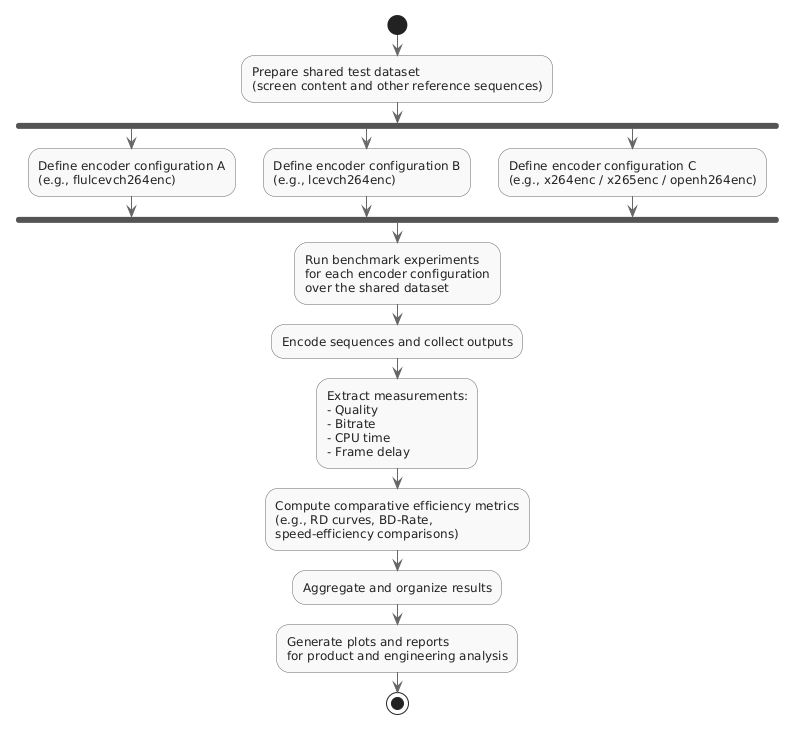
Figure 1. Automated RDCT benchmarking workflow.
The benchmark runs multiple GStreamer encoding pipelines over a shared dataset, collects quality, bitrate, CPU time, frame delay, and comparative efficiency measurements, and generates plots for product and engineering analysis.
Why screen content needs a specific benchmark
Remote desktop streaming is not just another video workload. Natural video usually contains camera motion, gradients, textures, noise, and photographic detail. Screen content has a different structure: text glyphs, sharp edges, flat regions, repeated UI components, diagrams, browser pages, spreadsheets, terminals, and application windows.
To make this difference visible, we analyzed the spatial and temporal complexity of the available test sequences. Spatial complexity captures the amount of detail, edges, and texture in each frame. Temporal complexity captures how much the content changes from frame to frame.
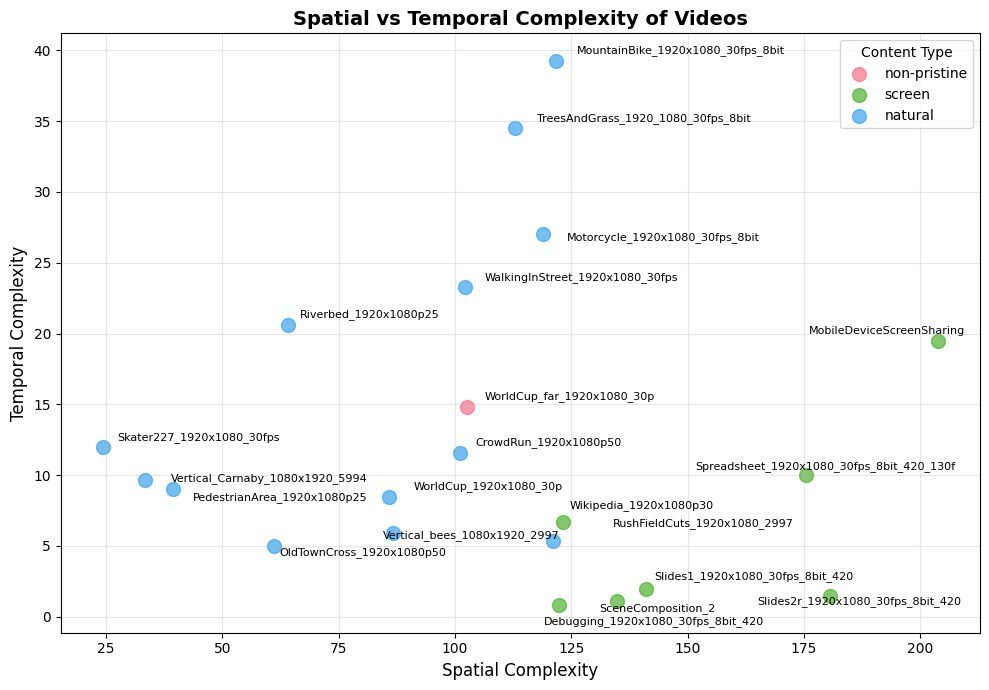
Figure 2. Spatial versus temporal complexity of the test sequences.
The benchmark dataset includes natural video, non-pristine content, and screen-content sequences. Screen-content samples such as slides, debugging sessions, spreadsheets, and browser pages tend to show high spatial complexity because of text, edges, and structured graphics, while their temporal behavior varies depending on scrolling, interaction, or UI updates.
This view is useful because it explains why a remote desktop benchmark should not rely only on traditional camera-video sequences. A codec configuration that performs well on natural video may not preserve text readability, UI sharpness, or desktop detail with the same efficiency. RDCT benchmarking, therefore, needs to include content that reflects real DaaS & VDI usage, not only generic video material.
Dataset: focusing on screen content first
For the main RDCT comparison, we focused on screen-content videos representative of DaaS & VDI workloads: development environments, slides, spreadsheets, browser content, and text-heavy UI sequences.
The final aggregate comparison used the following screen-content sequences:
| Sequence | Content type |
|---|---|
Debugging_1920x1080_30fps_8bit_420 | Development environment / code |
Slides1_1920x1080_30fps_8bit_420 | Presentation content |
Slides2r_1920x1080_30fps_8bit_420 | Presentation and graphics |
Spreadsheet_1920x1080_30fps_8bit_420_130f | Spreadsheet and tabular UI |
Wikipedia_1920x1080p30 | Browser and text-heavy content |
Some additional sequences from the initial pool were set aside for separate investigation because they exposed measurement-analysis issues. Keeping those cases visible internally is part of the benchmark’s value, but the aggregate results below focus on the validated screen content subset.
Compression efficiency versus CPU time
The main aggregate comparison used x264enc with the ultrafast preset and zerolatency tuning as the anchor. This is a practical reference point because low-latency H.264 configurations remain relevant in remote desktop environments.
In the reported screen-content results, Fluendo’s LCEVC-enhanced H.264 encoder achieved approximately -39.8% BD-Rate relative to the x264 low-latency anchor, with an average encoding time of 10.77 seconds in the tested setup.
For comparison:
| Configuration | BD-Rate vs. x264 ultrafast zerolatency | Average CPU time |
|---|---|---|
x265enc@ultrafast | ~-32.8% | 15.11 s |
flulcevch264enc@ce | ~-39.8% | 10.77 s |
lcevch264enc@x264 | ~-35.8% | 11.26 s |
openh264enc@low | ~-20.0% | 3.38 s |
x264enc@medium | ~-29.0% | 11.10 s |
The result is relevant because Fluendo’s implementation improved compression efficiency over the low-latency H.264 anchor while staying faster than the x265enc@ultrafast reference in this experiment. It also slightly improved the BD-Rate and CPU-time profile compared with the community LCEVC H.264 configuration used in the benchmark.
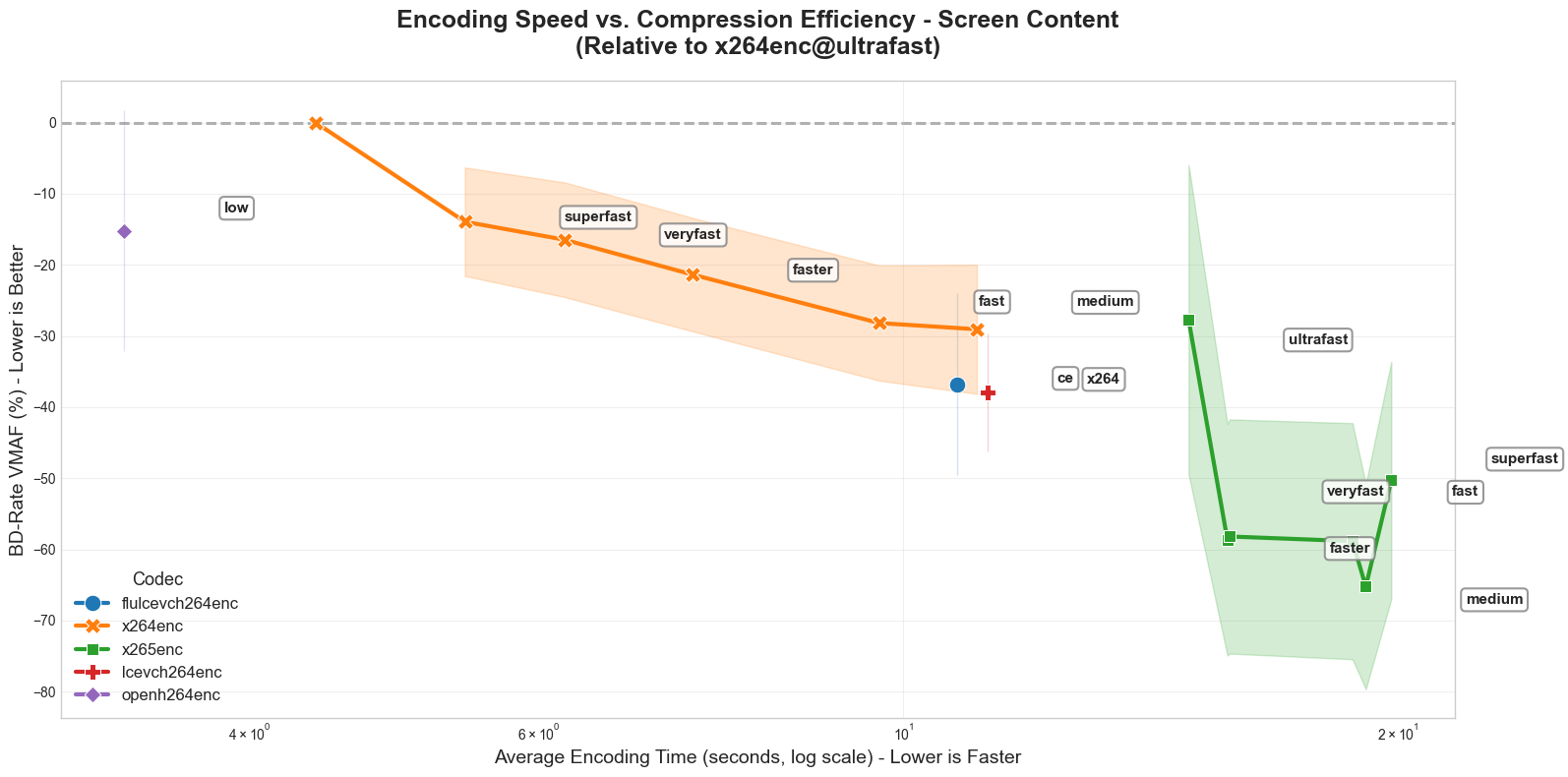
Figure 4. Encoding speed versus compression efficiency.
Aggregate screen-content comparison showing the trade-off between BD-Rate improvement and average encoding time across the tested encoder configurations.
Zero-frame delay: a key requirement for DaaS & VDI
Remote desktop streaming is interactive. A codec may provide good compression, but if it buffers frames before producing output, the user can feel the delay.
For this reason, we measured frame delay as part of the benchmark. In the tested configurations, Fluendo’s LCEVC-enhanced H.264 encoder operated with 0-frame delay, matching the behavior required for real-time desktop pipelines. Despite being configured for low latency, which implies a zero delay requirement, the community LCEVC implementation used in the experiment introduced a 3-frame delay, while x265 introduced a 4-frame delay in the tested configuration.
This result matters because it shows that compression gains alone are not the full story. RDCT has to remain compatible with real-time interaction requirements, not just offline coding efficiency.
Benchmarking as part of the RDCT product strategy
The most important conclusion from this work is that RDCT benefits from a systematic evaluation layer built on top of the codec itself.
Remote desktop coding is highly context-dependent. A configuration that works well for slides may not behave the same way for spreadsheets, video playback, browser scrolling, CAD tools, or mobile screen sharing. A base codec change can also affect compression efficiency, CPU cost, frame delay, and visual quality. The same enhancement-layer strategy may therefore require different tuning depending on customer infrastructure, protocol constraints, endpoint capabilities, and the dominant desktop content type.
This benchmark helps turn those variables into measurable engineering and product decisions. Instead of assuming that a single codec configuration is always the best option, RDCT can use structured evaluation to identify which coding strategy best fits each workload.
For RDCT, that means:
| Product need | Benchmarking contribution |
|---|---|
| Select the best base codec and preset | Compare compression efficiency, CPU time, frame delay, and quality behavior under the same workflow |
| Tune RDCT for DaaS & VDI workloads | Use screen-content datasets rather than only natural-video sequences |
| Validate competitive positioning | Compare RDCT-oriented configurations against x264, x265, OpenH264, and community LCEVC references |
| Guide product optimization | Identify where codec configuration, enhancement-layer behavior, or desktop-specific tuning should improve next |
| Support customer-specific decisions | Re-run experiments with customer-like content and deployment constraints |
Conclusions
The RDCT benchmarking work produced two main outcomes.
First, it showed promising codec behavior for the tested screen-content dataset. Fluendo’s LCEVC-enhanced H.264 encoder achieved strong compression gains relative to the low-latency H.264 anchor, reached a favorable speed-efficiency position compared with the x265enc@ultrafast reference, and maintained strict 0-frame delay in the tested configurations.
Second, it reinforced the role of systematic evaluation in RDCT product development. The benchmark enabled comparing codec configurations within a repeatable workflow, analyzing desktop-oriented content separately from natural video, and connecting codec-level measurements to product-relevant decisions: which backend to use, which configuration to tune, which workloads require special handling, and how RDCT compares with practical alternatives.
For DaaS & VDI, this is the right direction. RDCT is not only a codec implementation. It is becoming a structured way to evaluate, tune, and integrate desktop-specific coding tools under real product constraints: quality, bandwidth, CPU cost, frame delay, compatibility, and operational scalability.
Next steps
Future work should focus on three areas.
First, we should continue improving the internal benchmarking framework itself: cleaner automation, stronger reporting, reproducible configuration sets, and better support for comparing multiple codec backends.
Second, we should expand the product-oriented evaluation methodology. This includes adding CPU-instruction-based complexity metrics, richer desktop-quality diagnostics, and better ways to detect whether a coding tool improves real desktop usability, not only aggregate objective scores.
Third, we should expand the dataset with more DaaS & VDI workloads: office applications, browser sessions, video-in-desktop scenarios, development environments, dashboards, CAD-like interfaces, high-DPI desktops, and constrained-network cases.
A remote desktop codec should not be judged by a single curve. It should be judged by how well it performs under the constraints that real users and providers experience every day. That is the role of RDCT benchmarking inside Fluendo’s product strategy.
We are ready to bring this data-driven performance to your platform. Contact us today