
AI virtual camera that offloads inference to the Thin Client

Written by
Marek OlejnikNovember 24, 2026
Table of Contents
- The three ideas behind it
- Deployment topology
- Inside the virtual camera
- The control channel
- Compute offload savings in high-density deployments
- Try it on your own deployment
Remote desktop and VDI platforms are optimized around one number: how many sessions a server can host. Every workload that lands inside the session competes for that budget. Camera redirection already moves video capture into the session, so an AI feature applied to that camera — background removal, background replacement, anonymization — has traditionally meant running inference on the server, once per session, for as long as the camera is open.
That is the wrong place to do it. The frames originate on the client machine, where modern endpoints already ship with a GPU capable of running AI models in real time. Moving the inference there changes the capacity equation: the server keeps decoding, compositing, and encoding the session, and stops paying for AI inference entirely.
This post describes the Fluendo AI camera: a Media Foundation virtual camera that wraps a physical camera, applies AI background removal on the client GPU, and exposes the result as an ordinary Windows camera that the remote session can use and configure.
The three ideas behind it
The solution is built on three deliberate decisions.
1. AI inference and rendering run on the client. The virtual camera captures from the physical camera, runs the background-removal model through Raven AI Engine on the client GPU, and composites the foreground over the configured background image — all before the frame ever reaches the RDP session. A modern endpoint — a thin client, a mini-PC, or a laptop with a DirectX 12-capable GPU — becomes an AI-capable device rather than a passthrough device.
2. Configuration lives in the remote session. Properties are read and written from inside the session, using a light control application that talks to the client over a dedicated RDP Dynamic Virtual Channel. No extra port, no extra service, no firewall rule — the control traffic travels inside the connection that already exists. The same settings can also be edited by hand in a JSON configuration file on the client.
3. The processing chain is extensible. Background removal is the first AI stage in the pipeline, a naive proof-of-concept prototype to validate our hypothesis. Anonymization, face masking, sensitive-data blurring, and other camera-level effects are the same kind of problem: a model, a render pass, and a handful of properties to control them.
Deployment topology
The camera and the control app are two independent pieces that meet inside the RDP session.
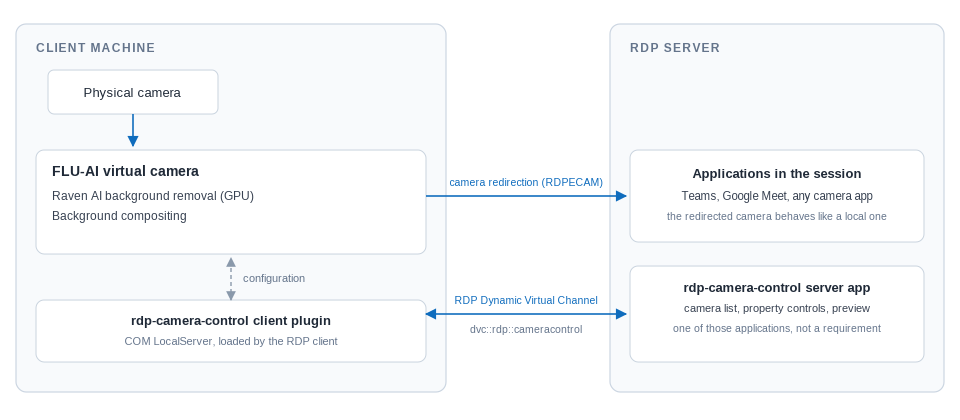
Figure 1. Deployment topology. The FLU-AI virtual camera runs on the client. Its frames reach the session via camera redirection and can be used by any application there; property messages travel in both directions over the dynamic virtual channel between the client plugin and the control app.
Two paths cross the connection, and they are completely separate:
- Media path — the virtual camera is a normal camera on the client, so RDP camera redirection carries its frames into the session. No custom protocol is involved; Windows does the redirection.
- Control path — the client plugin and the control app exchange small JSON messages over an RDP Dynamic Virtual Channel. This is what gives the session visibility and control over camera properties.
The control app is only one consumer of that camera. Inside the session the redirected device is an ordinary camera, so Teams, Google Meet or any other camera application can select it and receive frames that are already background-processed on the client. The control app exists to expose the settings those applications cannot see.
On the client, the virtual camera is indistinguishable from a physical one:
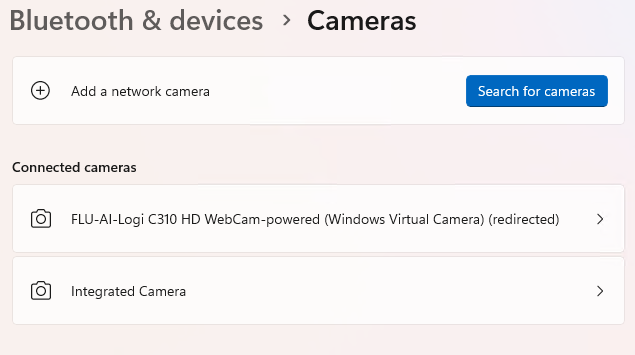
Figure 2. The virtual camera on the client machine.
Windows lists FLU-AI-Integrated Camera-powered (Windows Virtual Camera) next to the physical Integrated Camera. Any application that enumerates cameras sees it, and RDP camera redirection treats it like any other capture device.
Inside the session, the same camera appears with the standard redirection suffix:
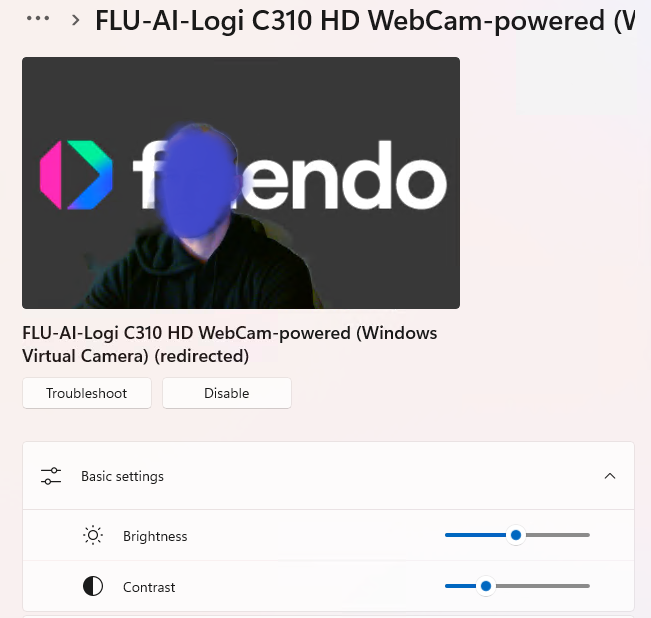
Figure 3. The redirected camera in the remote session.
The redirected device is exposed as ... (Windows Virtual Camera) (redirected), with the frames already background-processed on the client. The Windows camera settings page can change simple controls, but it knows nothing about the virtual camera’s own settings — that is what the control app is for.
Inside the virtual camera
The client component is fluendo_virtual_cam.dll, a Media Foundation virtual camera implemented with the Windows virtual camera platform. It runs inside the Windows camera pipeline (Camera Frame Server), so it needs no service, no tray application and no environment variable at runtime.

Figure 4. Frame path through the virtual camera. Capture, AI background removal and compositing all happen on the client GPU; the session only ever receives the finished frame.
The inference stage is not tied to a single vendor or graphics API. Raven automatically selects the best available device at runtime — AMD, Intel, or NVIDIA — and accepts video from multiple graphics APIs, including DirectX 12 and Vulkan. The same pipeline is therefore meant to run on the discrete GPU of a workstation and on the integrated graphics of a mini-PC or a thin client alike.
The control channel
The control app (rdp-camera-control) runs inside the remote session. It opens the virtual channel of the session it runs in, requests the camera list, and builds its UI from what the client reports. The client side is a COM LocalServer plugin that the RDP client loads automatically once registered.
Everything travels over one RDP Dynamic Virtual Channel, dvc::rdp::cameracontrol.
Because the channel is part of the RDP connection, there is no listening port, no service, and no firewall rule on either side. If the session exists, the channel exists.
The redirection itself uses the standard RDPECAM channel that Windows provides for camera redirection. That channel carries the video frames, but it is very limited when it comes to forwarding camera properties — which is why property control runs on a dedicated virtual channel instead of trying to extend the redirection one.
The messages are small JSON payloads: the client reports the cameras and their available properties, the session sends property changes, and the client acknowledges each one.
Every property the driver exposes
The app forwards every camera control the driver exposes through Media Foundation, including the ones that the Windows camera settings page does not show. What is available varies by device: the client reports what each camera supports, and the session builds a matching control for each of them.
The virtual camera settings
For our virtual cameras, the app exposes its own settings in addition to the standard ones: the background image (a local path on the client machine or a remote HTTP/HTTPS URL fetched by the client), background removal (on/off), and the graphics adapter used for inference. Those are the settings the redirection channel cannot carry, and controlling them from the session is what makes the split between client and server practical.
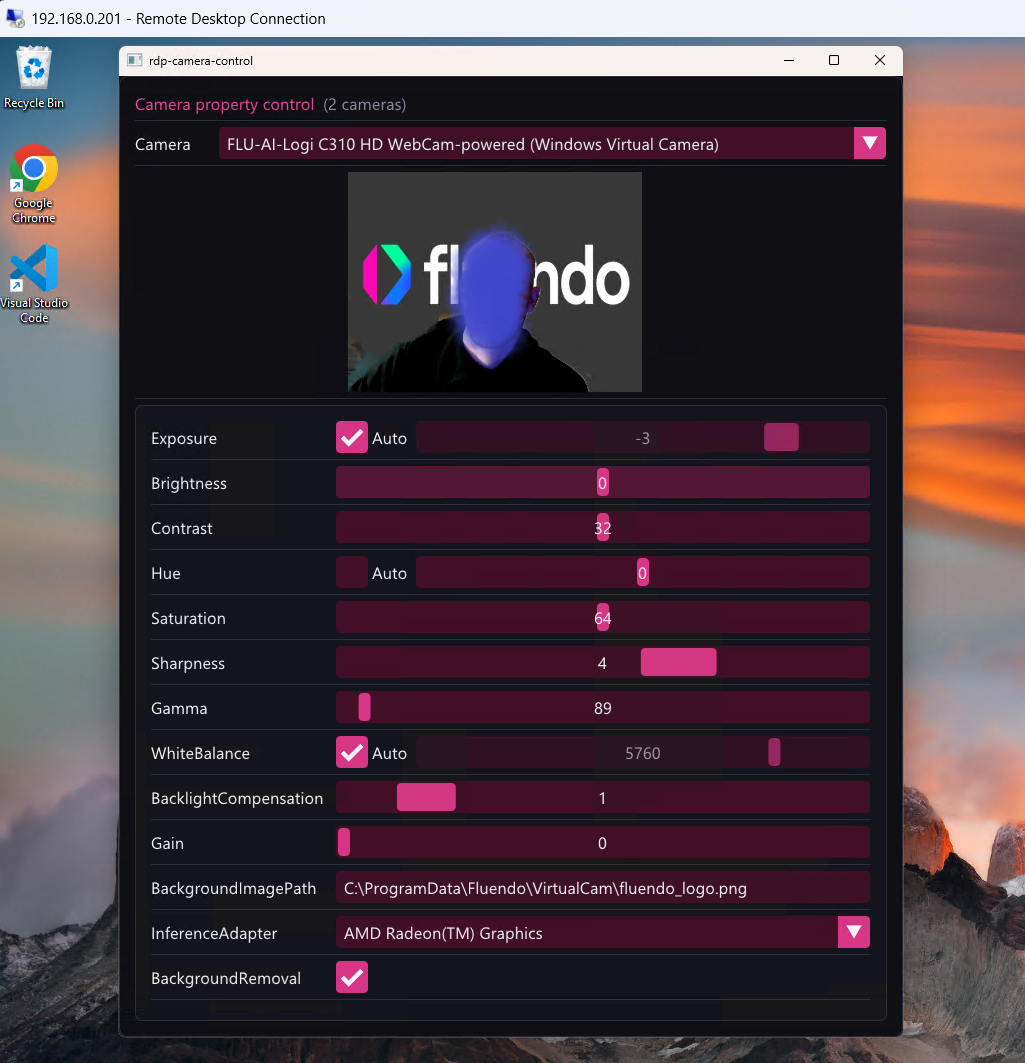
Figure 5. Camera properties controlled from the remote session. The control app shows a live preview of the redirected virtual camera and one control per property. The camera controls come from the camera driver; the virtual camera’s own settings — background image, background removal and inference adapter — are read from and written to the client’s configuration file. (Face masked for privacy.)
Compute offload savings in high-density deployments
Running AI inference inside virtual desktops introduces severe infrastructure bottlenecks:
- Server saturation: Real-time computer vision models (30 fps per active user) rapidly consume server GPU and CPU cycles, competing directly with display capture and session encoding.
- Inflated cloud and hardware OpEx: Processing video server-side forces IT teams to provision GPU-accelerated instances (e.g., cloud GPU families or expensive vGPU licensing) solely to handle webcam streams.
Shifting the burden to the edge
By keeping inference strictly on the client endpoint, the capacity model changes significantly:
- Zero marginal inference cost on the host: Whether 1 or 50 concurrent users activate background removal, the server experiences no additional compute overhead beyond standard webcam decoding. Session density remains predictable.
- Elimination of peak-hour overprovisioning: Server clusters do not need to be sized for worst-case scenarios where dozens of employees join video calls simultaneously.
- Modest client footprint: In our benchmarks, running background removal on an NVIDIA RTX A2000 Laptop GPU utilized ~20% of the GPU, leaving ample headroom for local display, applications and the RDP client itself. The exact figure depends on camera resolution and frame rate, and the inference adapter can be pinned in the UI when a machine has more than one GPU.
- Nothing to deploy on the host: Because compositing happens locally before redirection, the session host receives a finished frame — there is no model to distribute, no inference runtime to install and version in the golden image, and no GPU capacity to reserve for camera workloads.
The figure above is a single measured data point on a discrete laptop GPU, not a fleet-wide assumption. Integrated AMD and Intel GPUs are supported targets via the same DirectX 12 path, but the cost profile varies by device class, so benchmark your endpoint hardware before sizing a deployment.
Try it on your own deployment
The same pipeline is designed to host more AI stages — anonymization, face or license-plate blurring, sensitive-data masking — so the endpoint can grow without changing anything on the server side.
If you are running VDI or DaaS and want AI video features without paying for them on the server, the Fluendo AI camera is designed for exactly that split. Get in touch with our team to discuss your setup, or explore Fluendo AI Plugins if you need the same AI stages inside a GStreamer pipeline instead of a camera device.